

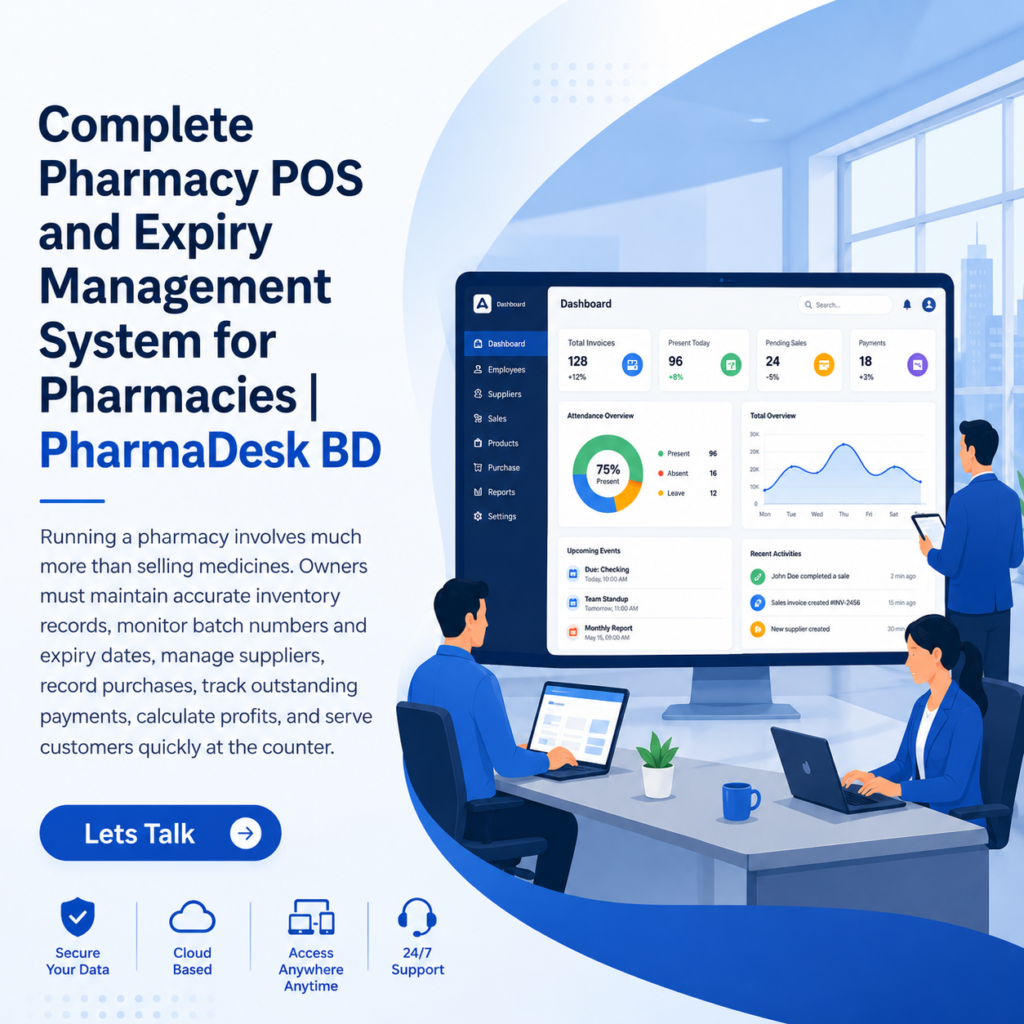
Complete Pharmacy POS and Expiry Management System for Pharmacies | PharmaDesk BD
Running a pharmacy involves much more than selling medicines. Owners must maintain accurate inventory records, monitor batch numbers and expiry dates, manage suppliers, record purchases, track outstanding payments, calculate profits, and serve customers quickly at the counter.
We're here to build your very own E-commerce Platform

Transform your digital storefront with our all-in-one E-commerce solution, streamlining sales, inventory management, and customer engagement for optimal growth.


Why PharmaDesk BD : A Complete Pharmacy POS?
Why PharmaDesk BD?
PharmaDesk BD is built specifically for the daily realities of Bangladeshi pharmacies—not just for billing. It connects sales, stock, batches, expiry dates, suppliers, dues, and profit reporting in one simple system.
- Prevent expiry losses: Get automatic 90, 60, and 30-day alerts before medicines expire.
- Sell the right batch first: FEFO automatically selects the earliest-expiring eligible batch.
- Faster counter sales: Search, scan, bill, receive payment, and print receipts within seconds.
- Accurate batch-wise stock: Every batch keeps its own quantity, purchase cost, and expiry date.
- Automatic stock updates: Purchases increase stock and completed sales reduce it instantly.
- Low-stock prediction: See which medicines may run out soon based on their sales speed.
- Supplier and due management: Track purchases, credit terms, payment dates, returns, and outstanding balances.
- Real profit reporting: Calculate profit using the actual purchase cost of the batch sold.
- Barcode and mobile support: Use a USB scanner at the counter or a phone camera on mobile.
- Made for Bangladesh: Supports Bangladeshi medicines, taka pricing, local pharmacy workflows, and Bangla and English use.
PharmaDesk BD helps pharmacies sell faster, reduce mistakes, prevent medicine wastage, and make better business decisions—all from one connected platform.
Why Do Pharmacies Need PharmaDesk BD?
Managing a pharmacy manually can lead to stock errors, expired medicines, missed supplier payments, slow billing, and inaccurate profit calculations. PharmaDesk BD brings every essential operation into one connected system.
Pharmacies need PharmaDesk BD to:
- Prevent expiry losses with automatic 90, 60, and 30-day alerts.
- Track every batch accurately, including cost, quantity, and expiry date.
- Sell medicines faster through quick search, barcode scanning, and an easy POS.
- Avoid selling expired stock through automatic blocking at checkout.
- Prevent stockouts with low-stock alerts and sales-based predictions.
- Manage suppliers and dues without relying on separate notebooks or spreadsheets.
- Calculate real profit using the actual purchase cost of each batch.
- Access the business anywhere through web and mobile support.
- Reduce human error by automatically connecting purchases, sales, stock, dues, and reports.
PharmaDesk BD is needed because it helps pharmacy owners save time, reduce losses, protect customers, and run the entire business with greater accuracy and control.
Why Does a Modern Pharmacy Need PharmaDesk BD?
A modern pharmacy needs more than a basic billing system. It needs accurate stock control, faster customer service, expiry protection, supplier management, and real-time business insights—all connected in one platform. PharmaDesk BD is designed to provide exactly that.
Faster and Smarter Sales
Quick medicine search, barcode scanning, automatic batch selection, payment processing, and receipt printing help staff serve customers faster while reducing billing errors.
Better Expiry Control
Automatic 90, 60, and 30-day alerts give pharmacies enough time to sell or return near-expiry medicines. Expired batches can be blocked automatically at the POS.
Accurate Batch-Wise Inventory
Every medicine batch has its own quantity, purchase price, and expiry date. PharmaDesk BD uses FEFO—First Expired, First Out—to sell the earliest-expiring eligible batch first.
Fewer Stockouts
Low-stock alerts and sales-speed predictions show which medicines need to be reordered before shelves become empty.
Complete Supplier Management:
Complete Supplier Management
Pharmacies can track supplier contacts, purchases, credit terms, outstanding dues, payment dates, and return adjustments in one place.
Real Profit Visibility
Profit is calculated using the actual purchase cost of the batch sold, giving owners a clearer understanding of margins and top-performing medicines.
Access from Web and Mobile
Owners can manage pharmacy operations from the counter or monitor important information from a mobile device.
Safer and More Professional Operations
Batch traceability, expiry blocking, detailed receipts, and accurate records improve customer safety, accountability, and operational control.
PharmaDesk BD helps a modern pharmacy work faster, reduce medicine wastage, prevent mistakes, improve profitability, and make better decisions using real-time information.
Key Benefits of Pharmacy Management Software:
Pharmacy management software helps pharmacies automate daily operations, reduce mistakes, improve customer service, and maintain better control over inventory and finances.
Faster Billing and Customer Service:
Quick medicine search, barcode scanning, automatic price calculation, and receipt printing help staff complete sales faster and reduce waiting time at the counter.
Accurate Inventory Management:
The software automatically updates stock after every purchase and sale, giving pharmacy owners a real-time view of available medicines.
Batch and Expiry Tracking:
Every medicine batch can be tracked separately by quantity, purchase cost, batch number, and expiry date. This helps prevent expired medicines from remaining unnoticed.
Reduced Expiry Losses:
Automatic alerts notify staff before medicines expire, providing enough time to sell, return, or properly dispose of the stock.
Low-Stock Alerts:
The system identifies medicines that are running low and helps pharmacies reorder products before they become unavailable.
Safer Medicine Sales:
Expired or restricted batches can be blocked automatically at the point of sale, reducing the risk of accidental sales.
Better Supplier Management:
Pharmacies can manage supplier information, purchase history, credit periods, outstanding dues, payment dates, and medicine returns from one place.
Scalable for Business Growth:
Accurate Profit Calculation:
The software compares the actual purchase cost with the selling price to calculate real profit, margins, and top-performing medicines.
Fewer Manual Errors:
Automating stock updates, calculations, invoices, supplier balances, and reports reduces mistakes caused by handwritten records or spreadsheets.
Detailed Reports:
Daily sales, profit, purchases, inventory, expiry losses, and supplier dues can be reviewed through clear reports and dashboards.
Better Business Decisions:
Real-time data helps pharmacy owners understand sales trends, popular medicines, slow-moving stock, and areas where costs can be reduced.
Improved Record Keeping:
Invoices, purchase entries, batch records, supplier payments, and sales history remain securely organized and easy to retrieve.
Web and Mobile Access:
Modern pharmacy management software allows owners to monitor sales, stock, alerts, and reports from the counter or a mobile device.
Greater Efficiency and Control:
By connecting sales, inventory, suppliers, expiry dates, and reporting, the software gives pharmacy owners complete control over daily operations.
Pharmacy management software saves time, reduces losses, improves medicine safety, and helps pharmacies operate more efficiently and profitably.
Choose the Right Plan for Your Pharmacy
Simple, affordable pharmacy management plans designed for independent pharmacies, growing businesses and multi-branch operations.
- Pre-loaded 20,000+ SKU Bangladesh medicine database
- Web POS
- Android POS
- Basic FEFO management
- Expiry alerts
- Daily sales reports
- Daily cash reports
- No large upfront software investment
- 3 staff accounts
- Role-based permissions
- Daily 9 AM SMS owner digest
- Generic-to-brand alternative search
- Supplier due ledger
- Expired-batch return-note generation
- Bluetooth receipt printing
- Thermal receipt printing
- Phone-camera barcode scanning
- Unlimited staff
- Central warehouse inventory transfer
- Inter-branch stock visibility
- DGDA stock-audit reports
- Priority support
- Dedicated onboarding
Simple Plans for Every Pharmacy
Choose the PharmaDesk plan that fits your pharmacy today and scale as your business grows.
- Pre-loaded 20,000+ SKU Bangladesh medicine database
- Web POS
- Android POS
- Basic FEFO management
- Expiry alerts
- Daily sales reports
- Daily cash reports
- No large upfront software investment
- 3 staff accounts
- Role-based permissions
- Daily 9 AM SMS owner digest
- Generic-to-brand alternative search
- Supplier due ledger
- Expired-batch return-note generation
- Bluetooth receipt printing
- Thermal receipt printing
- Phone-camera barcode scanning
- Unlimited staff
- Central warehouse inventory transfer
- Inter-branch stock visibility
- DGDA stock-audit reports
- Priority support
- Dedicated onboarding
Plan Overview
Compare PharmaDesk BD pricing at a glance.
| Plan | Monthly Price | Annual Price | Target Customer | Positioning |
|---|---|---|---|---|
| Starter | ৳790 | ৳7,900 | Small / micro pharmacy, single counter | Entry-level |
| Pro | ৳1,290 | ৳12,900 | Established pharmacy, up to 3 staff | Recommended / Core Plan |
| Enterprise | ৳2,990 / branch | ৳29,900 / branch | Chains, hospital pharmacies and super-shops | Premium |
How PharmaDesk Compares
A pharmacy-focused SaaS alternative to traditional POS software.
| Solution | Typical Pricing | Position | Key Advantage |
|---|---|---|---|
| Legacy Desktop Software | ৳10,000–৳25,000 one-time | SaaS subscription alternative | Cloud access + continuous updates |
| Custom Agency POS | ৳60,000–৳150,000+ one-time | Low monthly entry cost | Much lower initial investment |
| Generic Cloud POS | ৳500–৳1,500/month + setup | Pharmacy-specific SaaS | Pharmaceutical-specific functionality |
| PharmaDesk BD | ৳790–৳2,990/month | Three-tier SaaS | Pharmaceutical-first SaaS |
More Than a POS: An Expiry Loss Preventer
PharmaDesk BD is positioned not simply as POS software, but as an “Expiry Loss Preventer.” By helping pharmacies manage FEFO, expiry alerts, expired batches and stock visibility more effectively, PharmaDesk can help reduce avoidable expired-stock losses and make the subscription easier to justify.
A Complete Pharmacy Management System:
PharmaDesk BD brings these responsibilities into one connected pharmacy management system. It is designed for Bangladeshi pharmacies and combines point-of-sale operations, batch-level inventory, expiry alerts, supplier management, reporting, barcode scanning, and receipt printing. The platform is designed for both web and mobile use, with Bangla and English support. The medicine names, prices, contact details, dates, and financial figures shown below are sample data used to demonstrate how the system works.
Medicine Database:
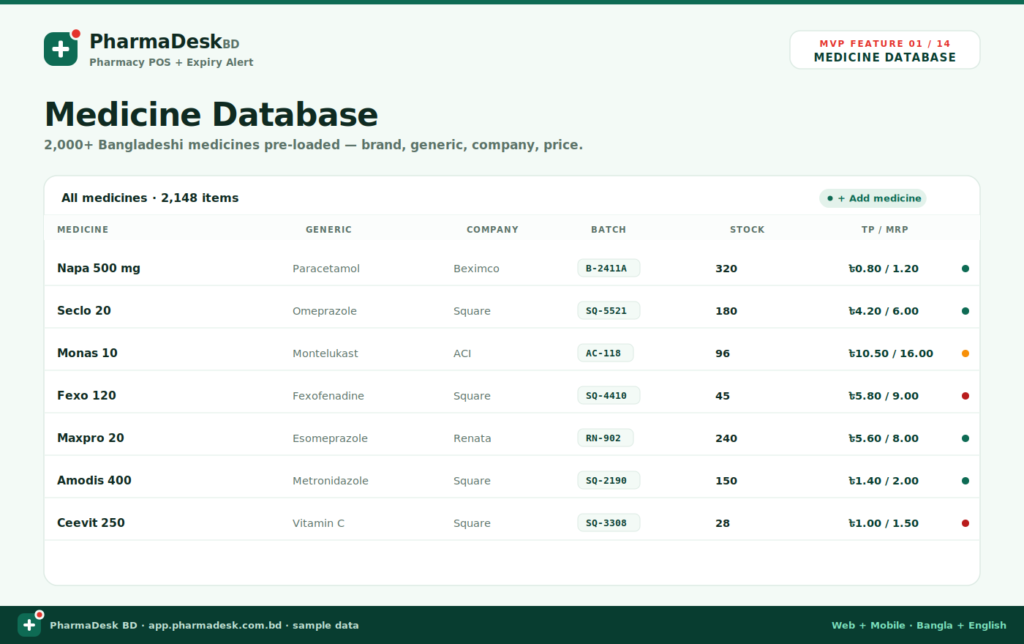
A reliable medicine database is the foundation of any pharmacy management system. PharmaDesk BD includes a preloaded database containing more than 2,000 Bangladeshi medicines, helping pharmacy staff begin using the software without manually entering every product. Each medicine record can contain essential information such as:
- Brand name
- Generic name
- Pharmaceutical company
- Batch number
- Available stock
- Trade price
- Maximum retail price
- Current stock status
The medicine list gives staff a clear overview of the pharmacy’s inventory. Medicines with healthy stock can be distinguished from products that are running low or require attention. Because the trade price and retail price are stored together, the system can also calculate the actual profit generated from each sale. The database therefore supports inventory control, faster billing, and more accurate financial reporting.
Expiry Date Tracking
Expiry management is one of the most important responsibilities in a pharmacy. Without a structured system, medicines can remain unnoticed on shelves until they are too close to expiry or have already expired.
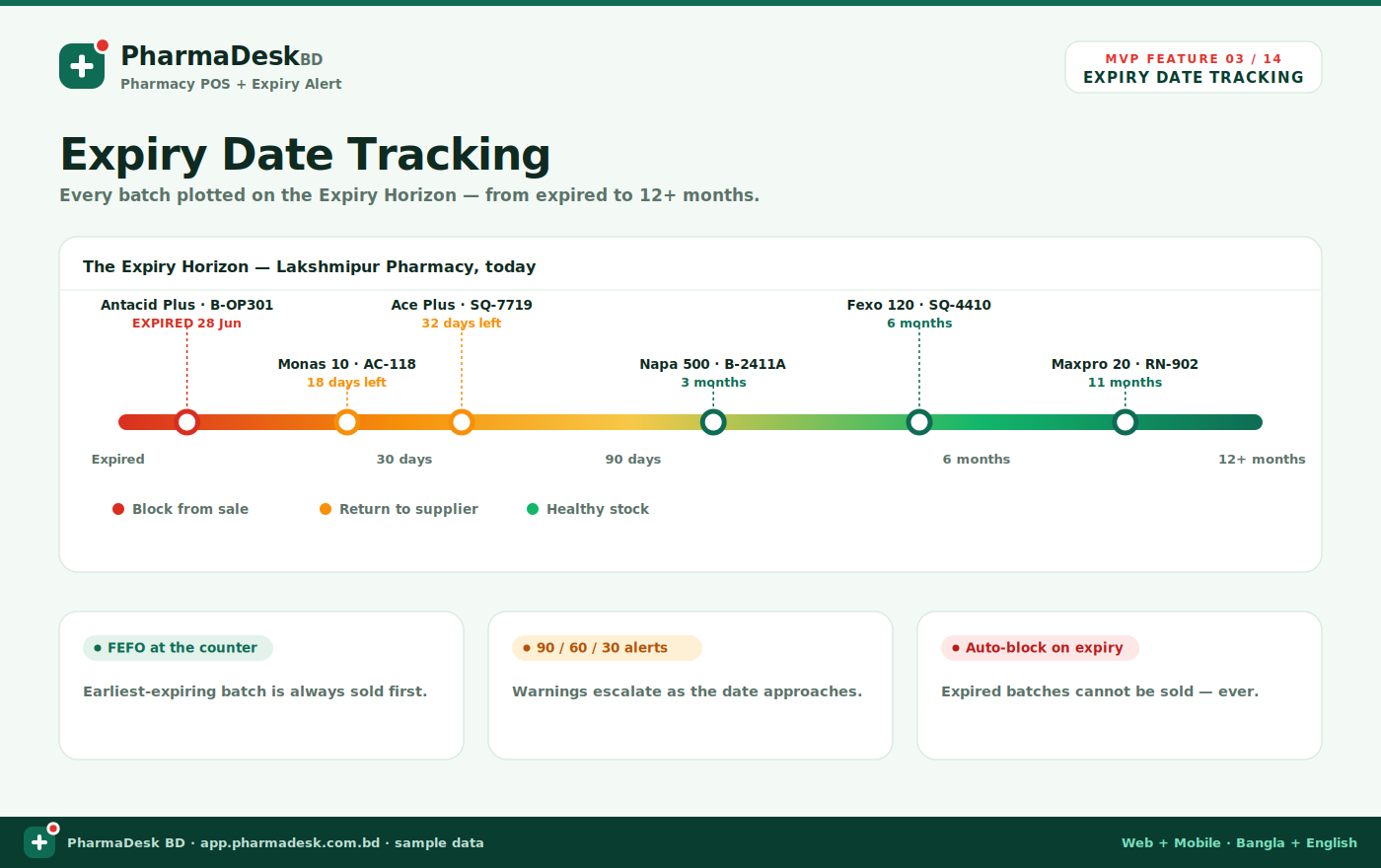
PharmaDesk BD presents batches on an easy-to-understand Expiry Horizon. This visual timeline places medicines into different expiry stages, including:
- Already expired
- Expiring within 30 days
- Expiring within 90 days
- Expiring within six months
- Healthy stock with longer shelf life
Colour-coded indicators make the situation immediately understandable. Red represents expired stock, amber identifies medicines that require early action, and green indicates healthy inventory.
The system can also apply FEFO automatically at the sales counter, issue increasingly urgent warnings as the expiry date approaches, and prevent expired batches from being sold.
This gives pharmacy owners enough time to promote near-expiry stock, return eligible products to suppliers, or move expired stock into the disposal process.
Batch Number Tracking
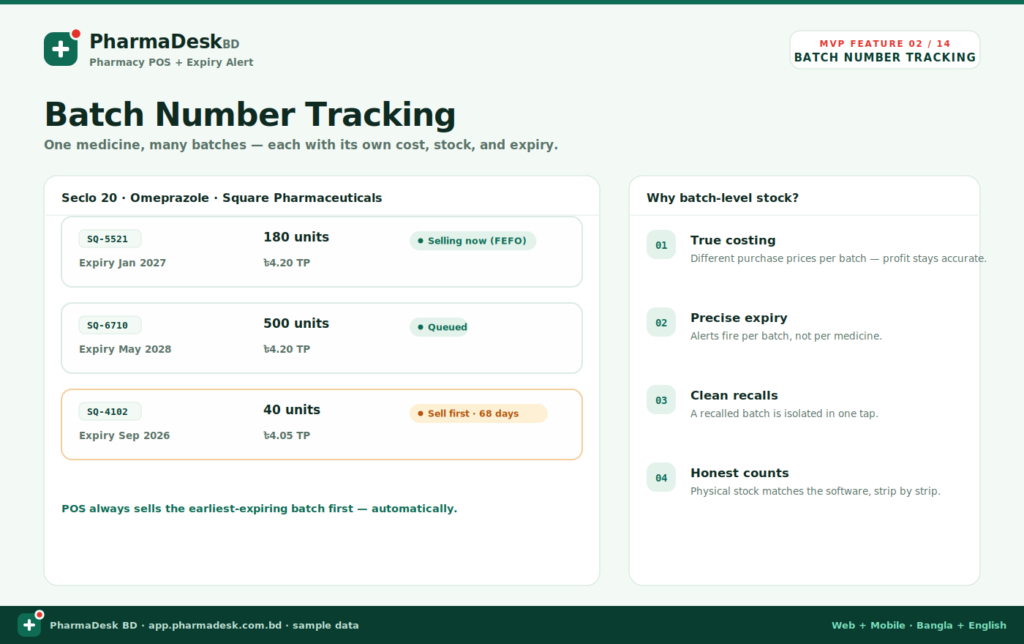
A single medicine may arrive at a pharmacy in several batches. Each batch can have a different purchase cost, quantity, and expiry date. Treating all units of a medicine as one stock entry can therefore create inaccurate records and increase the risk of selling expired products.
PharmaDesk BD tracks inventory at the batch level.
For every batch, the system records:
- Unique batch number
- Available quantity
- Purchase price
- Expiry date
- Selling priority
- Current batch status
The system can identify which batch is currently being sold and which batches are waiting in the queue. It follows the FEFO principle—First Expired, First Out—so the batch with the nearest expiry date is selected before batches that expire later.
Batch-level tracking also improves product recall management. When a manufacturer or regulator recalls a specific batch, the pharmacy can isolate that batch without affecting the entire medicine record.
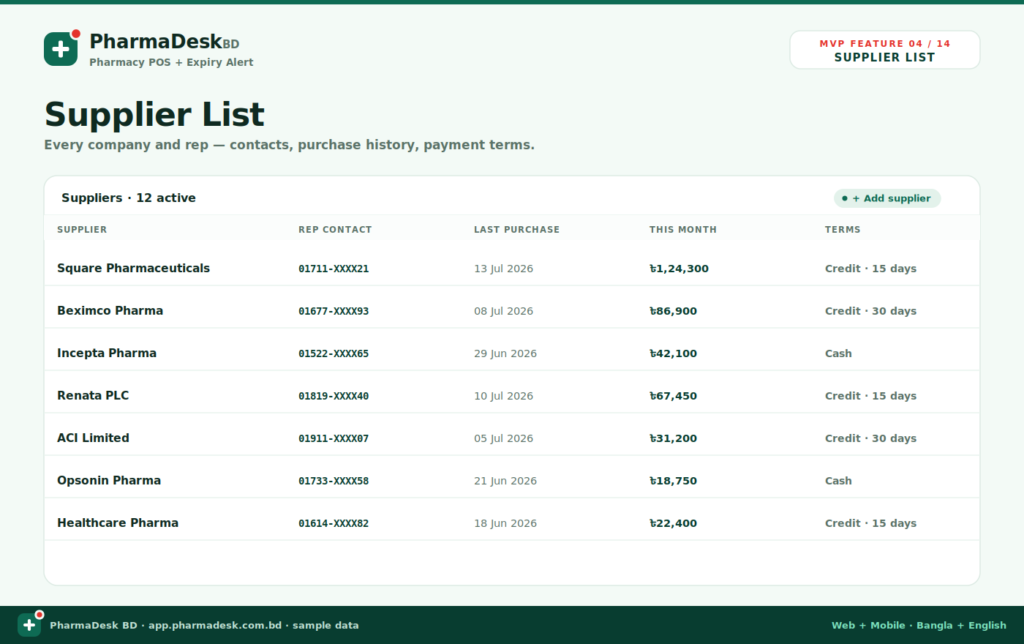
Supplier List:
Pharmacies often purchase medicines from multiple pharmaceutical companies, distributors, and representatives. Managing their contact information and commercial terms manually can become difficult as the business grows.
The PharmaDesk BD supplier list stores important supplier information in one place, including:
- Supplier or pharmaceutical company name
- Representative contact number
- Most recent purchase date
- Monthly purchase value
- Payment method
- Credit period
The system can distinguish between cash suppliers and suppliers offering credit terms such as 15 or 30 days.
With this information available on one screen, pharmacy owners can quickly review supplier relationships, identify recent purchase activity, contact representatives, and understand which companies provide the most favourable payment conditions.
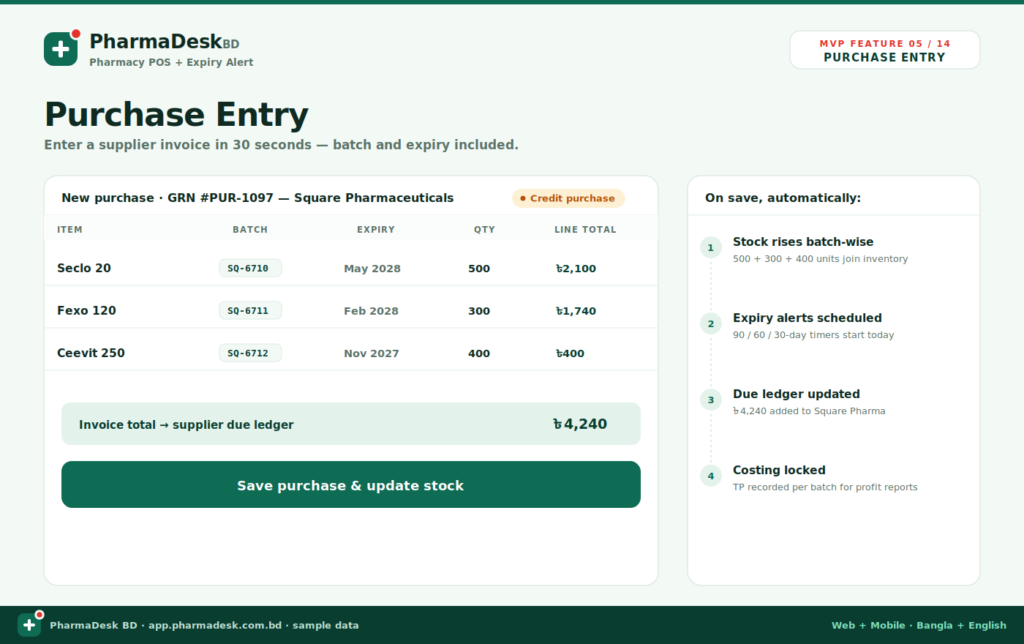
Purchase Entry:
When a supplier invoice arrives, the pharmacy must update stock, register batch numbers, record expiry dates, calculate the invoice value, and update the supplier’s outstanding balance.
PharmaDesk BD combines these activities into one purchase-entry workflow.
For each purchased medicine, staff can enter:
- Medicine name
- Batch number
- Expiry date
- Purchased quantity
- Trade price
- Line total
After the purchase is saved, the software automatically performs several actions. Stock increases batch by batch, expiry alerts are scheduled, the supplier ledger is updated, and the actual purchase cost is stored for future profit calculations.
For credit purchases, the complete invoice value can be added directly to the supplier’s due balance. This reduces repetitive data entry and helps prevent inconsistencies between inventory records and accounting information.
Sales Entry and Pharmacy POS:
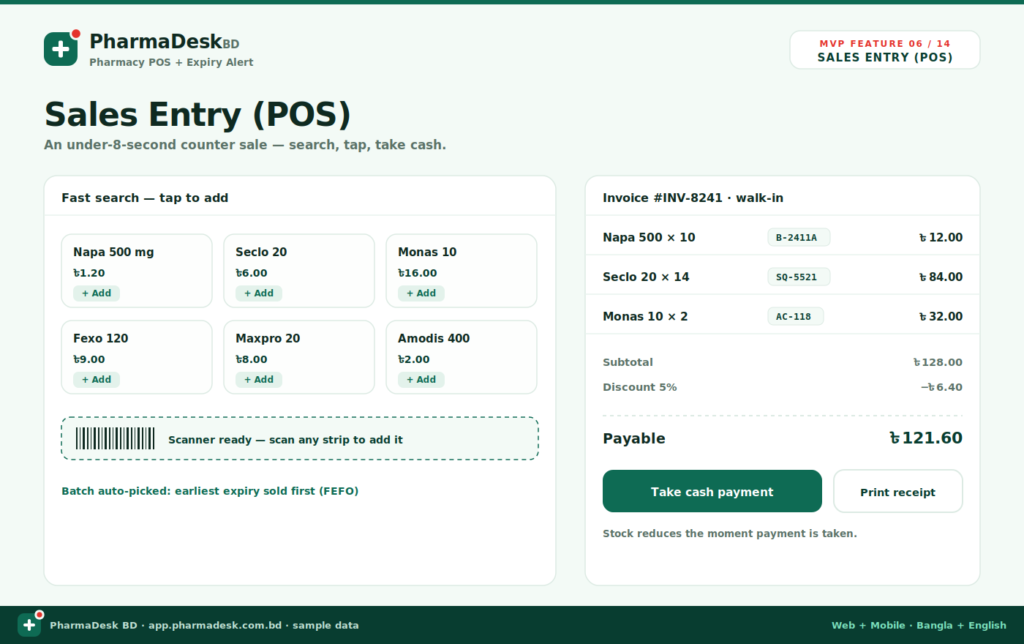
Speed is essential at a pharmacy counter, especially during busy hours. PharmaDesk BD provides a sales interface designed for quick medicine selection, billing, and payment collection.
The POS allows staff to:
- Search for medicines
- Tap a product to add it
- Scan a barcode
- Enter quantities
- Apply discounts
- Review the payable amount
- Accept cash payment
- Print a receipt
The system automatically chooses the earliest-expiring eligible batch when a product is added to the invoice. This applies the FEFO method without requiring the salesperson to inspect batch records manually.
Once payment is completed, the relevant stock quantity is reduced immediately. Each sold item remains connected to its batch, allowing the pharmacy to maintain complete sales traceability.
A streamlined sales process can shorten customer waiting times while reducing mistakes during billing and stock deduction.
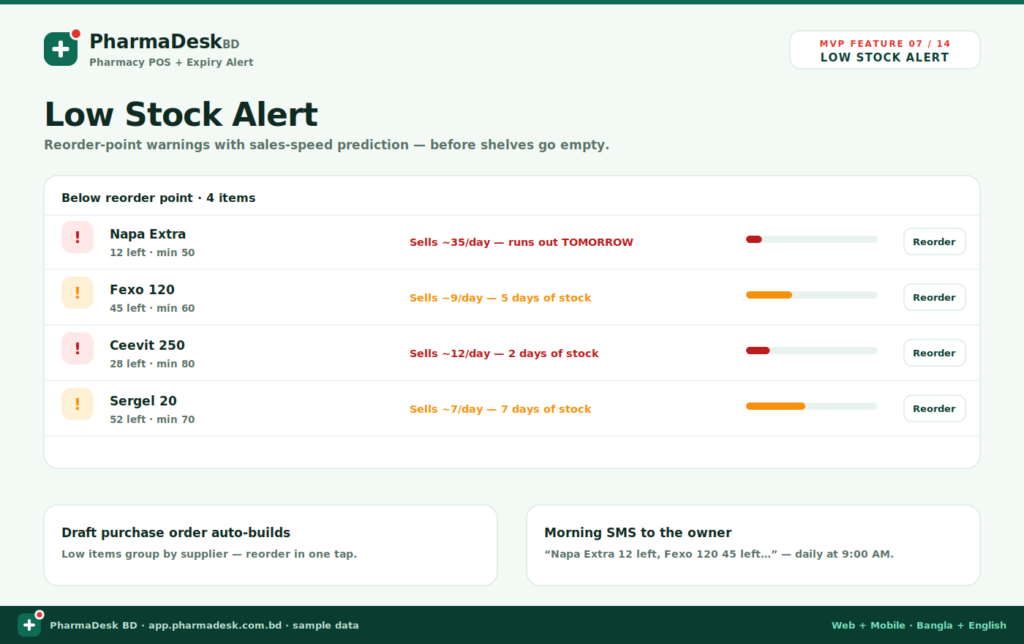
Low Stock Alert:
Running out of frequently purchased medicine can result in lost sales and dissatisfied customers. PharmaDesk BD monitors stock levels and compares them with a predefined reorder point.
When stock falls below the required minimum, the system displays a low-stock warning. The alert can include:
- Current stock quantity
- Minimum required stock
- Estimated daily sales
- Predicted number of days remaining
- Reorder action
The software does more than show the remaining quantity. It can use sales speed to estimate when a medicine may run out. For example, an item selling approximately 35 units per day may be marked as likely to become unavailable the following day.
Low-stock products can also be grouped by supplier to help create draft purchase orders. Pharmacy owners may receive a daily summary highlighting the products that require immediate reordering.
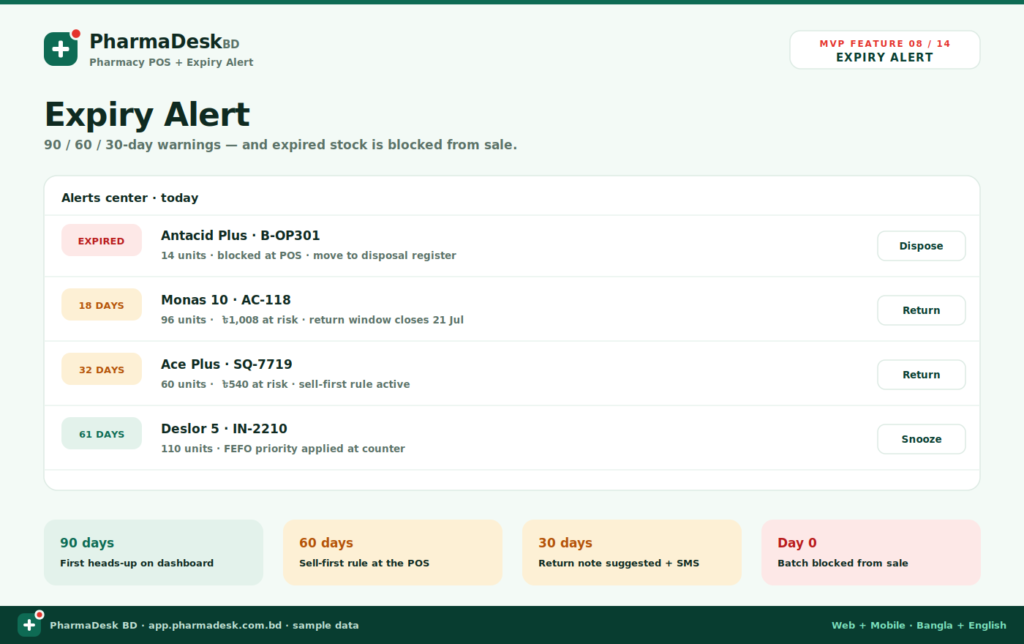
8. Expiry Alert
Expiry alerts turn expiry data into clear, actionable tasks.
PharmaDesk BD can generate warnings at different stages, including 90, 60, and 30 days before expiry. Each stage can trigger a different response:
- 90 days: Early notification on the dashboard
- 60 days: Higher selling priority at the POS
- 30 days: Supplier-return recommendation and notification
- Day zero: Automatic sales block
Each alert can show the medicine name, batch number, remaining quantity, number of days left, value at risk, and recommended action.
Available actions may include returning stock, postponing a reminder, recording disposal, or reviewing the relevant supplier.
Most importantly, expired batches can be blocked at the POS. This protects customers and prevents staff from accidentally completing a sale using expired stock.
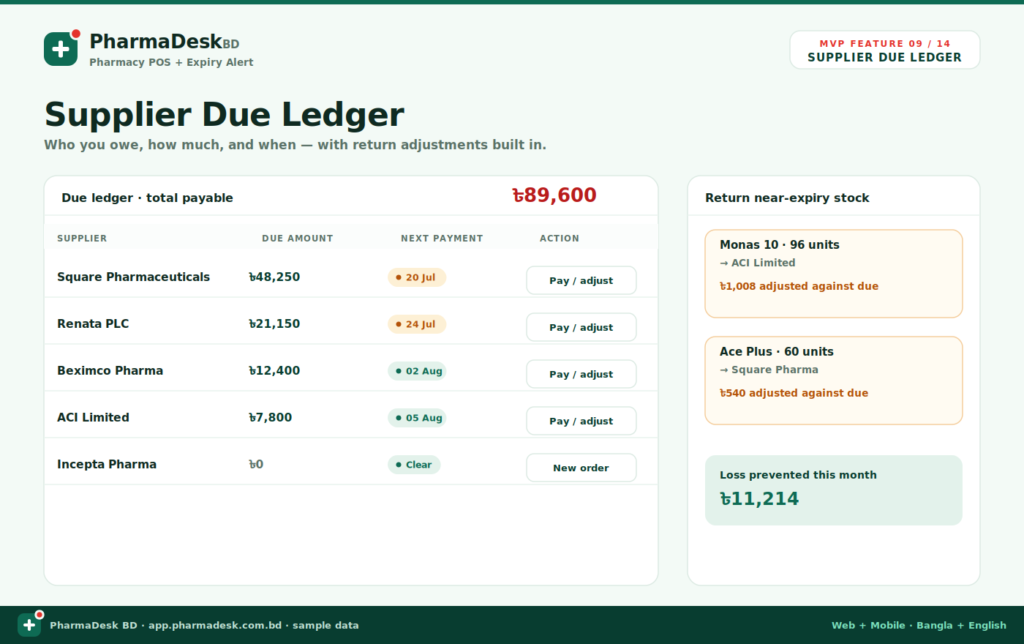
9. Supplier Due Ledger
Credit purchasing is common in pharmacy operations, but outstanding balances can become difficult to manage without a dedicated ledger.
The supplier due ledger shows:
- Supplier name
- Outstanding amount
- Next payment date
- Payment status
- Payment or adjustment action
- Total amount payable
Near-expiry returns can also be connected to the ledger. When medicine is returned to a supplier, the return value may be adjusted against the pharmacy’s outstanding balance.
For example, if near-expiry stock worth ৳1,008 is returned, the supplier due can be reduced by the same amount after the return is approved.
This creates a clearer financial record and prevents supplier-return credits from being forgotten. The system can also calculate the value of losses prevented through successful returns before expiry.
10. Daily Sales Report
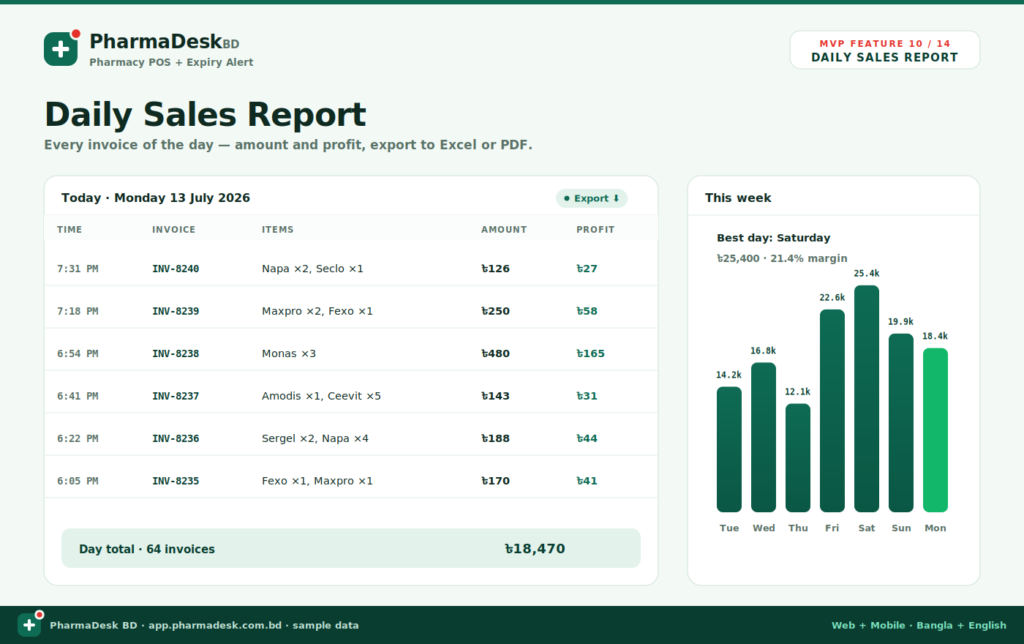
The daily sales report gives owners a complete view of the day’s transactions.
Each invoice record may include:
- Transaction time
- Invoice number
- Medicines sold
- Invoice amount
- Profit generated
A daily summary can show the total number of invoices and total sales value. Weekly charts make it easier to compare sales across different days and identify the strongest-performing day of the week.
These reports help owners understand busy hours, monitor daily turnover, detect unusual activity, and compare current performance with previous periods.
The report can also be exported to Excel or PDF for accounting, record-keeping, management review, or sharing with business partners.
11. Profit Report
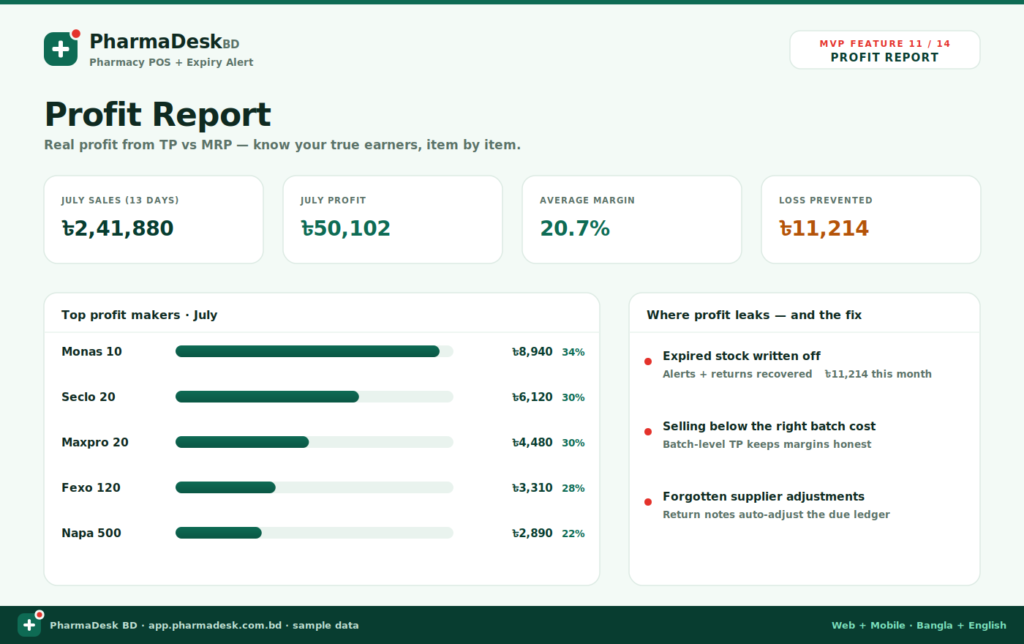
Sales revenue alone does not show whether a pharmacy is performing profitably. Accurate profit calculation requires the system to compare the selling price with the actual purchase cost of the batch sold.
PharmaDesk BD uses batch-level trade prices to calculate more realistic profit figures.
The profit dashboard can display:
- Total sales for the selected period
- Total profit
- Average profit margin
- Value of losses prevented
- Top profit-generating medicines
Individual products can be ranked by total profit and margin percentage. This helps pharmacy owners identify which medicines generate the most income and which high-volume products provide relatively low margins.
The report can also highlight common profit leaks, including:
- Expired stock written off
- Selling based on the wrong batch cost
- Unrecorded supplier adjustments
By connecting purchases, batches, sales, returns, and supplier dues, the system provides a more complete view of business profitability.
12. Fast Search
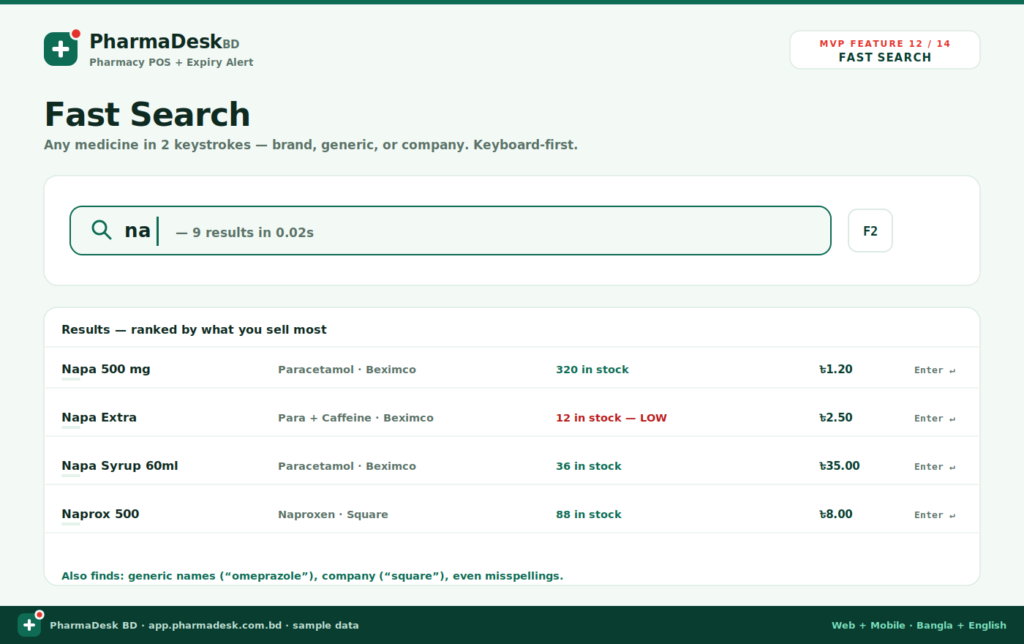
Searching for medicine should take seconds, not minutes. PharmaDesk BD provides a keyboard-first search designed for rapid counter operations.
Staff can search by:
- Brand name
- Generic name
- Pharmaceutical company
- Partial keyword
- Common misspelling
Results can be ranked according to the medicines most frequently sold by the pharmacy. Each result can show the product name, generic or company information, available stock, retail price, and low-stock warning.
Keyboard shortcuts allow experienced users to search and select medicines with minimal mouse interaction. This can be especially useful when processing a long queue of customers.
The fast-search system also improves accuracy by helping staff confirm the correct brand, generic name, price, and stock status before adding the item to a sale.
13. Barcode Support
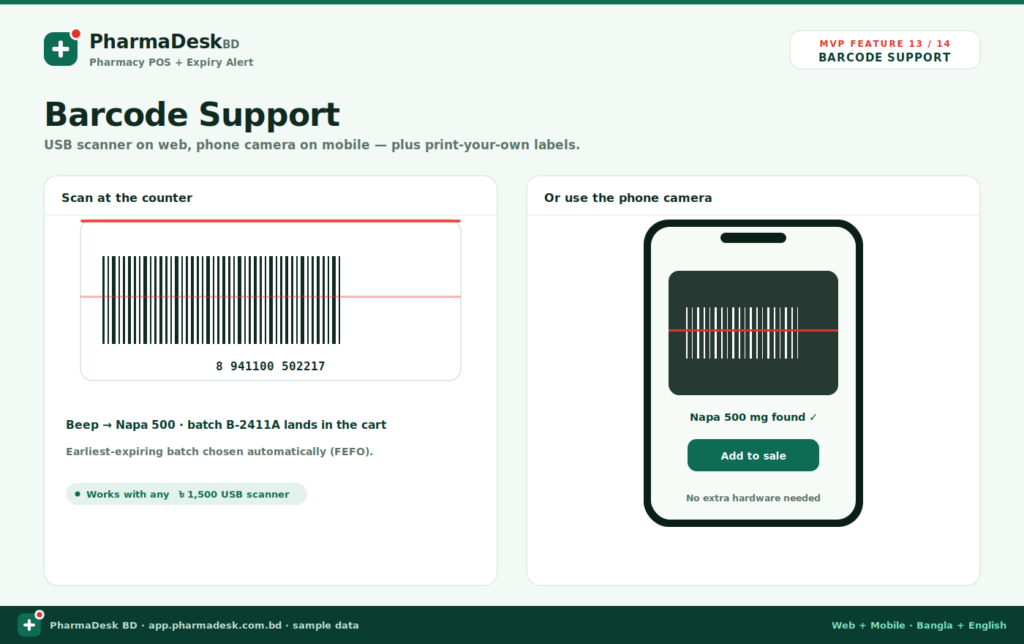
Barcode support makes the sales process faster and reduces product-selection errors.
PharmaDesk BD supports two main scanning methods:
USB barcode scanner
A standard USB barcode scanner can be used at the web-based pharmacy counter. When a medicine strip or box is scanned, the matching product is identified and added to the cart.
The system then selects the appropriate batch according to FEFO rules.
Mobile phone camera
On the mobile version, the phone camera can be used as a barcode scanner. This allows staff to identify products or create sales without purchasing additional scanning hardware.
Barcode support can also be useful for receiving stock, checking products, and printing pharmacy-specific barcode labels where required.
By connecting barcode recognition with batch and inventory data, the platform maintains both speed and traceability.
14. Receipt Printing
A professional receipt provides customers with clear transaction details and gives the pharmacy a reliable sales record.
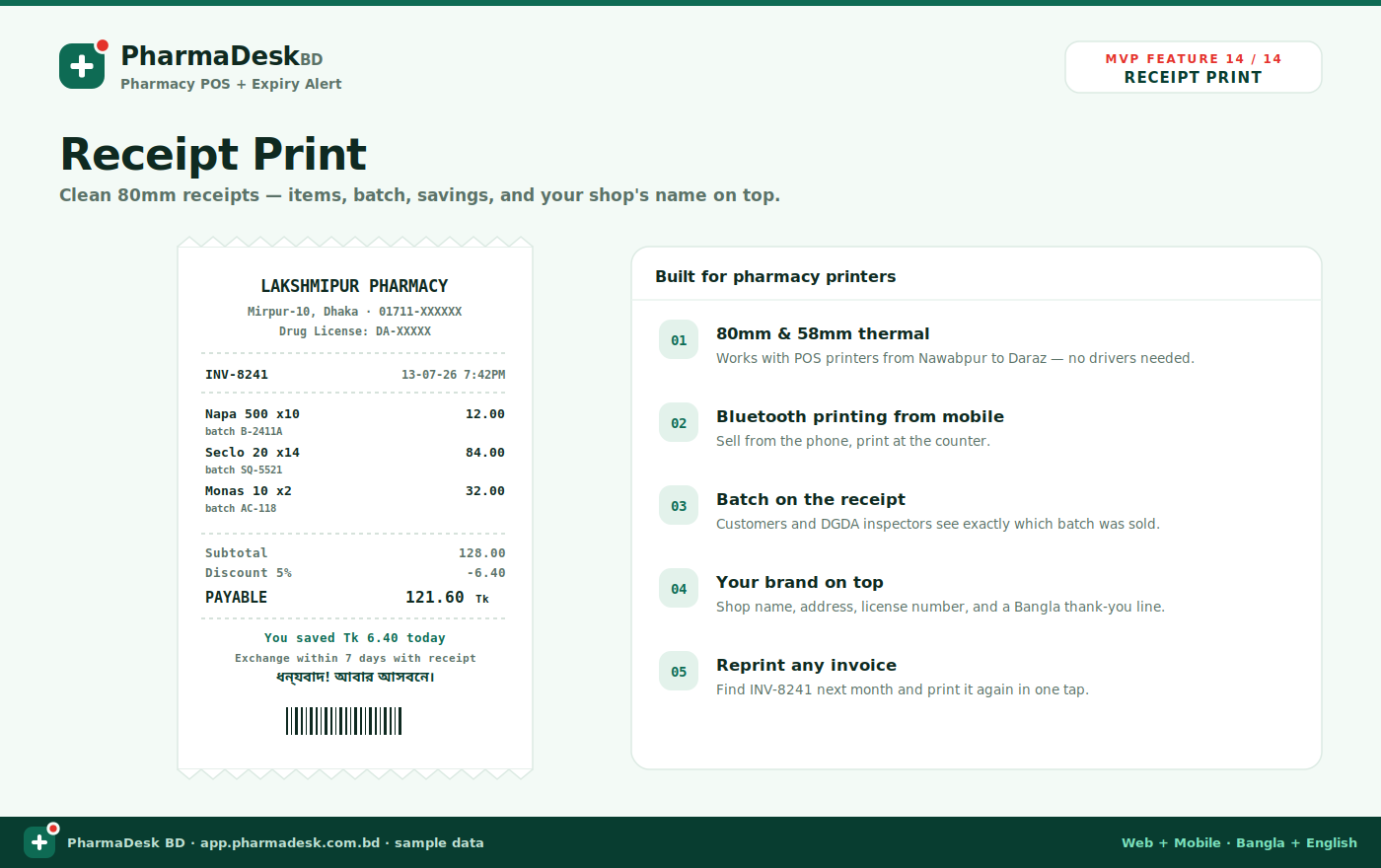
PharmaDesk BD supports clean thermal receipts for common pharmacy printer sizes, including 80 mm and 58 mm formats.
A receipt can contain:
- Pharmacy name
- Address
- Drug licence information
- Invoice number
- Transaction date and time
- Medicine names and quantities
- Batch numbers
- Subtotal
- Discount
- Final payable amount
- Savings information
- Barcode
- Custom Bangla message
Including the batch number on the receipt improves transparency and traceability. Customers, pharmacy staff, and inspectors can identify exactly which batch was sold in a transaction.
The platform can support printing from the web counter as well as Bluetooth printing from mobile devices. Previous invoices can also be located and reprinted when a customer needs another copy.
A Connected Workflow for the Entire Pharmacy:
The greatest advantage of PharmaDesk BD is that these features do not operate separately. When a purchase is entered, inventory increases, batches are registered, expiry alerts begin, and the supplier due is updated. When a sale is completed, the correct batch is selected, inventory decreases, profit is calculated, and the transaction appears in the daily report. When near-expiry medicine is returned, the supplier ledger is adjusted and the prevented loss is reflected in management reports. This connected workflow helps pharmacy owners achieve four important goals:
- Serve customers more quickly.
- Maintain accurate batch-wise inventory.
- Prevent losses caused by expired or unavailable stock.
- Understand the pharmacy’s real financial performance.
PharmaDesk BD is designed as more than a billing application. It is a complete pharmacy operations system built around the realities of medicine retailing in Bangladesh.
Its medicine database, batch tracking, FEFO sales process, expiry alerts, low-stock predictions, supplier records, due ledger, profit reports, barcode support, and receipt printing work together to provide greater control over daily operations.
For pharmacies currently relying on handwritten registers, disconnected spreadsheets, or basic billing software, a unified platform such as PharmaDesk BD can create faster service, more accurate records, safer medicine handling, and stronger business decisions.
Frequently Asked Questions
What is pharmacy management software?
Pharmacy management software is a digital system used to manage medicine sales, inventory, batch numbers, expiry dates, suppliers, purchases, payments, and business reports. It replaces handwritten registers and disconnected spreadsheets with one organized platform.
How does PharmaDesk BD help prevent expiry losses?
PharmaDesk BD tracks the expiry date of every medicine batch and provides advance alerts at different stages, such as 90, 60, and 30 days before expiry. This gives staff time to sell, return, or properly dispose of the affected medicines.
What is batch-wise inventory management?
Batch-wise inventory management means that every medicine batch is recorded separately. Each batch has its own batch number, quantity, purchase price, selling price, supplier, and expiry date. This provides more accurate stock and profit information.
How does pharmacy software make billing faster?
The software allows staff to find medicines through quick search, barcode scanning, brand names, generic names, or company names. Prices are calculated automatically, stock is deducted instantly, and a professional receipt can be printed after payment.
Can supplier dues and payments be managed in the system?
Yes. Supplier records can include purchase history, credit terms, outstanding balances, payment dates, and return adjustments. When a credit purchase is entered, the amount can be added automatically to the supplier’s due ledger.
Can pharmacy owners access the software from mobile devices?
Yes. PharmaDesk BD is designed for both web and mobile use. Staff can operate the system from the sales counter, while owners can review sales, stock, expiry alerts, supplier dues, and reports from a mobile device.
Why does a modern pharmacy need management software?
A modern pharmacy handles hundreds or thousands of medicines with different batches, prices, and expiry dates. Management software improves accuracy, speeds up billing, prevents stock shortages, reduces medicine wastage, and gives owners better control over daily operations.
Can the software prevent expired medicines from being sold?
Yes. Expired batches can be automatically blocked at the point of sale. Even when the medicine remains listed in the database, the system can prevent staff from selecting an expired batch for a customer.
What is FEFO, and how does it help a pharmacy?
FEFO means “First Expired, First Out.” The system selects the eligible batch with the nearest expiry date before selecting batches that expire later. This reduces wastage and helps pharmacies sell medicines in the correct order.
Does PharmaDesk BD provide low-stock alerts?
Yes. The system can notify pharmacy staff when medicine stock falls below a predefined minimum level. It may also use previous sales activity to estimate how soon a product could run out, allowing the pharmacy to reorder it in advance.
How is pharmacy profit calculated?
Profit is calculated by comparing the actual purchase cost of the sold batch with its selling price. This produces more accurate profit and margin reports than calculations based only on general product prices.
What are the main benefits of PharmaDesk BD?
PharmaDesk BD helps pharmacies complete sales faster, maintain accurate batch-wise stock, prevent expiry losses, reduce stockouts, manage suppliers, calculate real profit, and create detailed reports. It brings the pharmacy’s main operations into one connected system.
