

How BD Seller OS Improves Daily Operations
The system is designed around a connected eight-step process.
We're here to build your very own E-commerce Platform

Transform your digital storefront with our all-in-one E-commerce solution, streamlining sales, inventory management, and customer engagement for optimal growth.


How BD Seller OS Improves Daily Operations?
Key Features of BD Seller OS Online Ai Enabled Software Platform:
No more lost inbox orders:
Every confirmed customer request becomes a structured order with an order number.
Faster order entry:
Customer, product, courier, and delivery information are entered through one clear form.
Accurate COD amounts:
The system automatically calculates the product total and delivery fee.
Better stock control:
Stock decreases when an order is created and can return when a parcel is returned.
Clear courier accountability:
The seller can see exactly how much money is pending from each courier.
Fewer packing mistakes:
Invoices and order details provide the packer with a clear product and quantity list.
Better customer decisions:
Previous order and return history help the seller assess repeat customers.
Improved return reduction:
Return-reason reports show the main causes of unsuccessful deliveries.
Safer team expansion:
Different employees can receive different levels of access.
Business visibility from a phone:
The owner can monitor orders, stock, and cash without being in the office.
Important Production Integrations:
The uploaded demonstration shows the intended user experience. A complete production version may require integrations with external services. These could include:
- Facebook Messenger API
- WhatsApp Business API
- SMS provider
- Courier APIs
- Courier tracking services
- Courier settlement reports
- Payment gateways
- Cloud database
- User authentication
- Data backup
- Invoice PDF generation
Automatic customer-message extraction, direct WhatsApp sending, and live courier updates depend on the permissions and APIs available from the relevant platforms.
Data and Privacy Considerations:
BD Seller OS stores customer information such as names, phone numbers, and addresses. The business should protect this information carefully. Recommended practices include:
- Giving employees only the access they need
- Using strong passwords
- Keeping regular backups
- Using secure hosting
- Recording user activity
- Removing access when an employee leaves
- Publishing a clear privacy policy
- Avoiding unnecessary sharing of customer data
- Following applicable data-protection requirements
Customer information should only be used for legitimate order processing, delivery, customer support, and authorised marketing. BD Seller OS is designed for online sellers who have outgrown notebooks, spreadsheets, and Messenger-only order management. It converts customer conversations into structured orders, keeps product quantities connected to sales, organises parcel statuses, and separates delivered orders from courier payments.
Most importantly, it helps the seller understand where the cash is. The owner can see how much money has been collected, how much is still with couriers, which orders were returned, which products are running low, and which customers have ordered before.
For a small seller, this creates organisation. For a growing seller, it creates control. For a larger social-commerce team, it creates a shared operating system.
BD Seller OS is designed for online sellers who have outgrown notebooks, spreadsheets, and Messenger-only order management.
It converts customer conversations into structured orders, keeps product quantities connected to sales, organises parcel statuses, and separates delivered orders from courier payments. Most importantly, it helps the seller understand where the cash is. The owner can see how much money has been collected, how much is still with couriers, which orders were returned, which products are running low, and which customers have ordered before.
For a small seller, this creates organisation. For a growing seller, it creates control. For a larger social-commerce team, it creates a shared operating system.
Manage Every Order from Message to Money:
Stop losing orders in the inbox and stop guessing how much cash is still with couriers. Use BD Seller OS to manage orders, stock, delivery statuses, returns, customers, invoices, team access, and COD settlements from one web and mobile platform.
BD Seller OS — from Facebook message to cash in your account.
BD Seller OS Mobile App:
The mobile interface gives sellers access to the main business functions from a phone.
The demo is designed around the reality that many Bangladeshi online sellers manage their entire business from a mobile device.
The mobile app includes:
- Home dashboard
- Orders
- New-order button
- Stock
- Cash tracking
The mobile and web views use the same live demo data.
Mobile Dashboard:
The mobile home screen can show:
- Today’s order count
- Total COD pending
- Delivered orders
- Delivery success rate
- Orders requiring action
This allows the seller to check the business without opening a laptop.
Mobile Order Actions:
From the phone, the seller can:
- Create an order
- Mark an order as packed
- Mark an order as shipped
- Mark an order as delivered
- Mark a parcel as returned
- Record COD receipt
This is useful when the seller is away from the office or warehouse.
Mobile Stock View:
The mobile stock screen displays:
- Product names
- Categories
- Prices
- Current quantities
- Low-stock warnings
The seller can check availability while replying to a customer in Messenger or WhatsApp.
Mobile Cash View:
The cash screen shows:
- Total money with couriers
- Delivered parcels awaiting payout
- Parcels still on the road
This keeps COD settlement information available at all times.
Businesses That Can Use BD Seller OS
BD Seller OS can be used by many types of social-commerce businesses, including:
- Facebook clothing shops
- Cosmetics sellers
- Gadget sellers
- Jewellery businesses
- Food and grocery sellers
- Home-based businesses
- Saree and panjabi sellers
- Skincare shops
- Gift stores
- Mobile-accessory sellers
- Imported-product businesses
- Instagram shops
- WhatsApp-based sellers
- Small online boutiques
- Cash-on-delivery e-commerce businesses
The system is most valuable for businesses receiving regular inbox orders and using several couriers.
Important Production Integrations
The uploaded demonstration shows the intended user experience.
A complete production version may require integrations with external services.
These could include:
- Facebook Messenger API
- WhatsApp Business API
- SMS provider
- Courier APIs
- Courier tracking services
- Courier settlement reports
- Payment gateways
- Cloud database
- User authentication
- Data backup
- Invoice PDF generation
Automatic customer-message extraction, direct WhatsApp sending, and live courier updates depend on the permissions and APIs available from the relevant platforms.
Data and Privacy Considerations
BD Seller OS stores customer information such as names, phone numbers, and addresses.
The business should protect this information carefully.
Recommended practices include:
- Giving employees only the access they need
- Using strong passwords
- Keeping regular backups
- Using secure hosting
- Recording user activity
- Removing access when an employee leaves
- Publishing a clear privacy policy
- Avoiding unnecessary sharing of customer data
- Following applicable data-protection requirements
Customer information should only be used for legitimate order processing, delivery, customer support, and authorised marketing.
Conclusion
BD Seller OS is designed for online sellers who have outgrown notebooks, spreadsheets, and Messenger-only order management.
It converts customer conversations into structured orders, keeps product quantities connected to sales, organises parcel statuses, and separates delivered orders from courier payments.
Most importantly, it helps the seller understand where the cash is.
The owner can see how much money has been collected, how much is still with couriers, which orders were returned, which products are running low, and which customers have ordered before.
For a small seller, this creates organisation.
For a growing seller, it creates control.
For a larger social-commerce team, it creates a shared operating system.
Manage Every Order from Message to Money
Stop losing orders in the inbox and stop guessing how much cash is still with couriers.
Use BD Seller OS to manage orders, stock, delivery statuses, returns, customers, invoices, team access, and COD settlements from one web and mobile platform.
BD Seller OS — from Facebook message to cash in your account.
Frequently Asked Questions
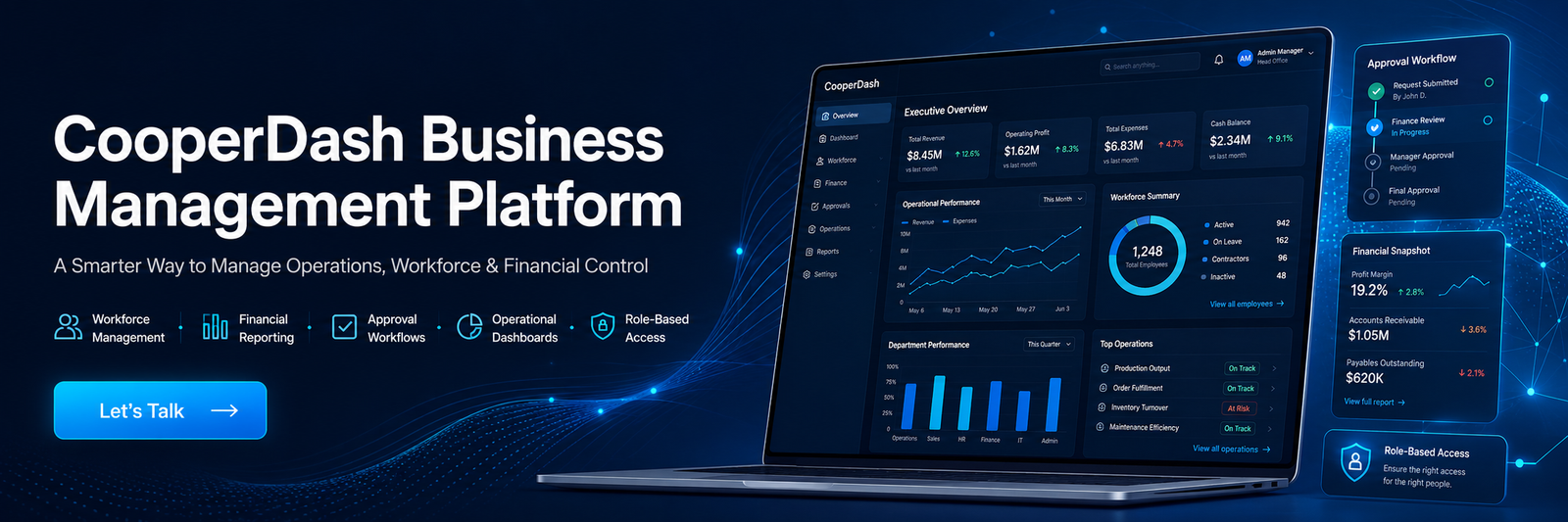
What is CooperDash?
CooperDash is a Business Management Platform designed to help organizations manage workforce administration, checkbook tracking, financial reporting, approval workflows, and operational dashboards from one secure system.
Who is CooperDash designed for?
CooperDash is designed for organizations that need better control over employee records, checkbook activities, financial reporting, approval processes, and business operations. It is suitable for corporate offices, cooperatives, financial teams, HR departments, administrative teams, and multi-branch organizations.
What problems does CooperDash solve?
CooperDash helps reduce manual record keeping, scattered spreadsheets, slow reporting, duplicate work, unclear approval processes, weak accountability, and limited operational visibility. It brings key business processes into one centralized digital platform.
Is CooperDash secure?
Yes. CooperDash is designed with role-based access control to protect sensitive organizational data. This helps reduce security risks by making sure users only access information they are authorized to view.
Can CooperDash support approval workflows?
Yes. CooperDash can support structured approval workflows that help organizations track requests, approvals, activity history, and status updates. This improves transparency, governance, and accountability.
Is CooperDash suitable for multi-branch organizations?
Yes. CooperDash is designed as a scalable platform that can support both single-office and multi-branch organizations. It can grow with the organization’s operational needs.
How does CooperDash improve decision-making?
CooperDash gives leadership teams access to accurate and up-to-date business information through centralized dashboards and reporting tools. This helps managers and executives make faster and more confident decisions.
Can CooperDash help with employee management?
Yes. CooperDash helps organizations manage employee records, workforce information, role-based access, and employee-related operational data in a more organized and reliable way.
Does CooperDash support checkbook tracking?
Yes. CooperDash includes checkbook tracking features to help organizations monitor checkbook issuance, return status, responsible users, and activity history. This improves accountability and reduces operational risk.
How does CooperDash improve financial reporting?
CooperDash helps make financial reporting faster, clearer, and more reliable by centralizing financial data and reporting workflows. Management teams can use the platform to monitor performance, review reports, and make better business decisions.
What is a role-based dashboard?
A role-based dashboard means each user sees information based on their responsibility. Executives, managers, supervisors, HR teams, finance teams, and employees can access only the data relevant to their role.
Can CooperDash help reduce administrative workload?
Yes. By replacing manual processes and fragmented record keeping with a centralized platform, CooperDash helps reduce administrative workload, minimize duplicate work, and improve overall productivity.
Does CooperDash help with compliance and audit readiness?
Yes. CooperDash helps create organized records, activity tracking, structured approvals, and better operational transparency. These features support compliance, governance, and audit readiness.
Why should an organization choose CooperDash?
An organization should choose CooperDash if it wants to move away from manual records, improve operational control, strengthen accountability, protect sensitive data, and manage workforce, checkbook, and financial processes from one secure platform.
