

Seller OS COD Order Management Software for Bangladesh | BD Seller OS
Thousands of online sellers in Bangladesh run their businesses through Facebook Messenger, WhatsApp, phone calls, and courier dashboards.
A customer sends a message asking for a product. The seller copies the customer’s name, phone number, and address into a notebook or spreadsheet. The order is then sent to a courier. Stock may be updated manually, and the seller waits several days to receive the cash-on-delivery payment.
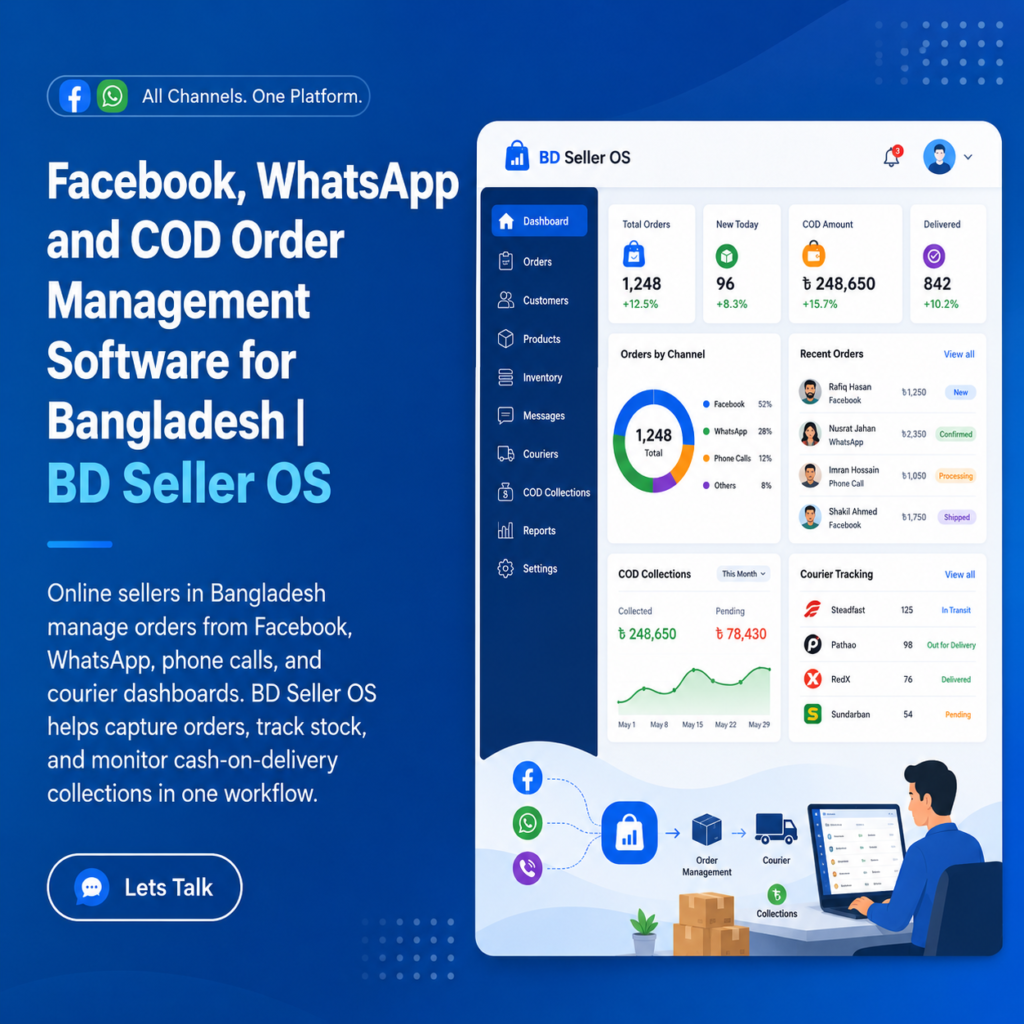
We're here to build your very own E-commerce Platform

Transform your digital storefront with our all-in-one E-commerce solution, streamlining sales, inventory management, and customer engagement for optimal growth.
Thousands of online sellers in Bangladesh run their businesses through Facebook Messenger, WhatsApp, phone calls, and courier dashboards. A customer sends a message asking for a product. The seller copies the customer’s name, phone number, and address into a notebook or spreadsheet. The order is then sent to a courier. Stock may be updated manually, and the seller waits several days to receive the cash-on-delivery payment.
As orders increase, this process becomes difficult to control. Customer details may be entered incorrectly. The same product may be sold after stock has run out. Delivered orders may remain unpaid by the courier. Returned parcels may not be added back to stock. Important conversations may disappear inside a crowded inbox. BD Seller OS is designed to solve these problems.
It is an order, inventory, courier, customer, and cash-on-delivery management system for Facebook and WhatsApp sellers in Bangladesh. The platform gives sellers one central place to create orders, monitor parcel statuses, track courier settlements, manage stock, review customer history, record returns, generate invoices, and understand daily business performance.
Instead of managing the business across Messenger chats, spreadsheets, courier portals, and handwritten notes, BD Seller OS brings the entire order cycle into one connected system.


Facebook, WhatsApp and COD Order Management Software:
What Is BD Seller OS?
BD Seller OS is a web and mobile business-management platform created for social-commerce sellers. It is particularly suitable for businesses that receive most of their orders through:
- Facebook pages
- Facebook Messenger
- Instagram messages
- Phone calls
- Manual customer enquiries
The platform is designed around the daily workflow of a Bangladeshi online seller. A seller can use it to manage:
- Customer orders
- Product quantities
- Delivery charges
- Courier assignments
- Cash-on-delivery amounts
- Order statuses
- Courier settlements
- Product stock
- Returned parcels
- Customer order histories
- Sales reports
- Profit estimates
- Team permissions
The demonstration includes both a web dashboard and a mobile-app view. This is important because many social-commerce sellers operate almost entirely from their phones. They reply to customers, confirm addresses, contact couriers, and monitor deliveries while moving between home, office, warehouse, and market.
Why Facebook and WhatsApp Sellers Need an Order Management System?
Social media makes it easy to start an online business. A seller can upload a product photo, run an advertisement, and begin receiving messages without building a complete e-commerce website. However, Messenger and WhatsApp are communication tools. They are not complete order-management systems. A chat conversation does not automatically tell the seller:
- How many orders are pending
- Which parcels have been packed
- Which parcels are currently with a courier
- How much cash the courier owes
- Which products are almost out of stock
- Which customers have returned previous orders
- Why parcels are being returned
- How much money was collected this week
- Which team member is responsible for a task
When the seller receives only a few orders, these questions may be manageable manually. When the business grows to dozens or hundreds of orders, small mistakes can create significant financial losses. BD Seller OS converts customer conversations into organised business records.
The Complete BD Seller OS Workflow:
The system follows an order from the first customer message to the final COD settlement.
A typical workflow is:
Customer message → order entry → stock update → confirmation → packing → shipping → delivery → courier settlement → reporting
Every stage is recorded.
This gives the seller a clear answer to three important questions:
- Where is the parcel?
- Where is the cash?
- Is the stock accurate?
Creating Orders from Messenger or WhatsApp:
The order form is designed around the information sellers normally receive in a chat. A new order can contain:
- Customer name
- Mobile number
- Delivery address
- Product
- Quantity
- Delivery zone
- Delivery fee
- Courier company
- Total COD amount
The seller can enter this information directly while speaking with the customer. The demo also includes an auto-fill example showing how details from a Messenger conversation could be transferred into the order form.
In a real production system, automatic extraction from Messenger or WhatsApp would require an approved integration with the relevant platform APIs. Even without automatic extraction, the structured form makes manual entry faster and more reliable than using a notebook or unformatted spreadsheet.
Multiple Products in One Order:
A customer may purchase more than one product. BD Seller OS allows multiple products and quantities to be added to the same order. For example, a customer may order:
- One lipstick set
- Two face packs
- One saree
The system calculates the product subtotal automatically. It then adds the appropriate delivery charge and displays the final amount the courier must collect from the customer.
This reduces calculation mistakes and gives the customer a clear order total.
Delivery Zone and Charge Calculation:
Delivery charges often differ between Dhaka and other districts. The demo includes separate delivery zones such as:
- Inside Dhaka
- Outside Dhaka
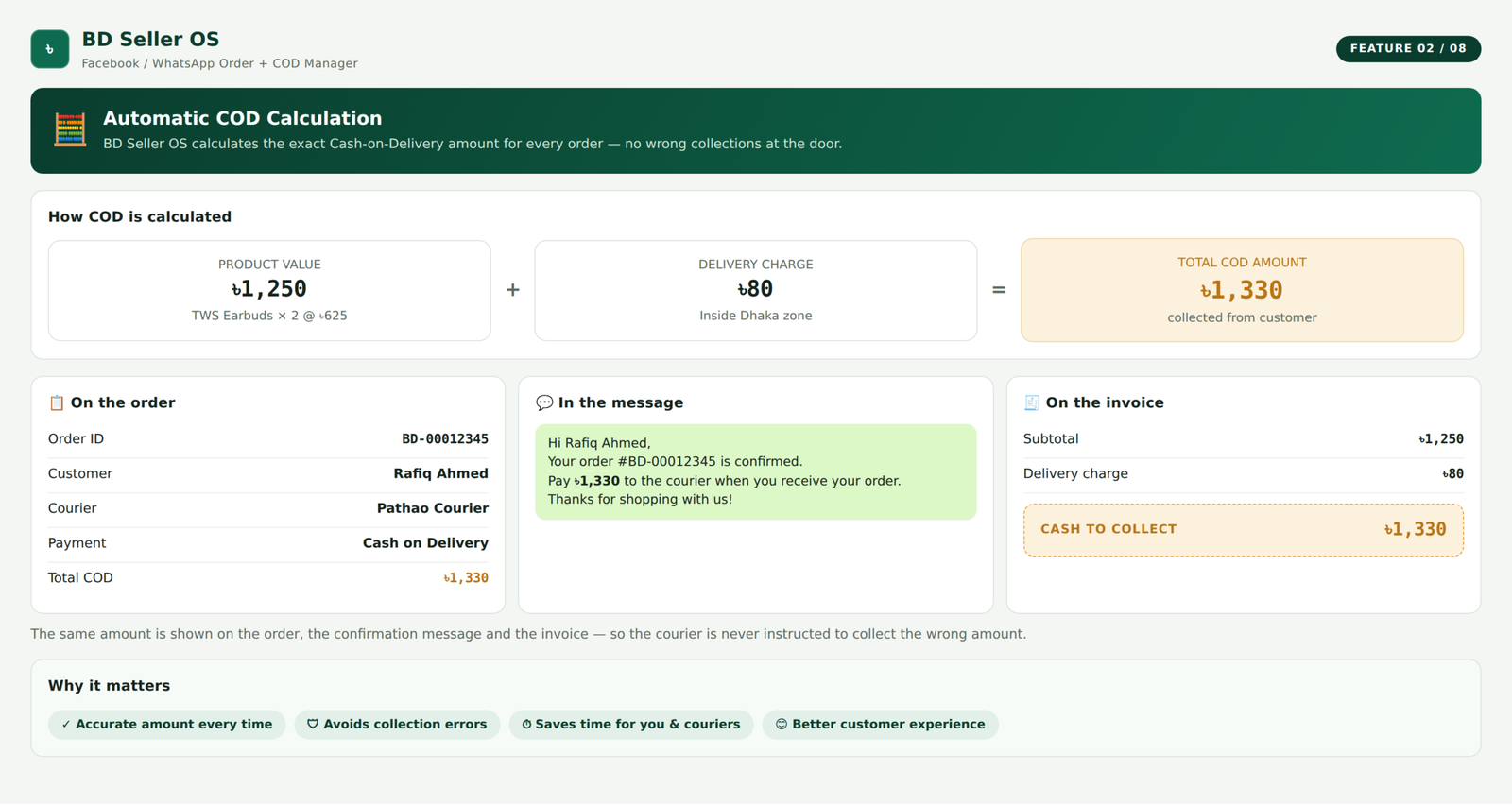
When the seller selects the delivery zone, the correct charge is added to the order. The final COD calculation becomes: Product subtotal + delivery charge = total cash to collect
This amount can be shown on the order confirmation and invoice. Because the amount is calculated by the system, the seller does not need to calculate it manually for every order.
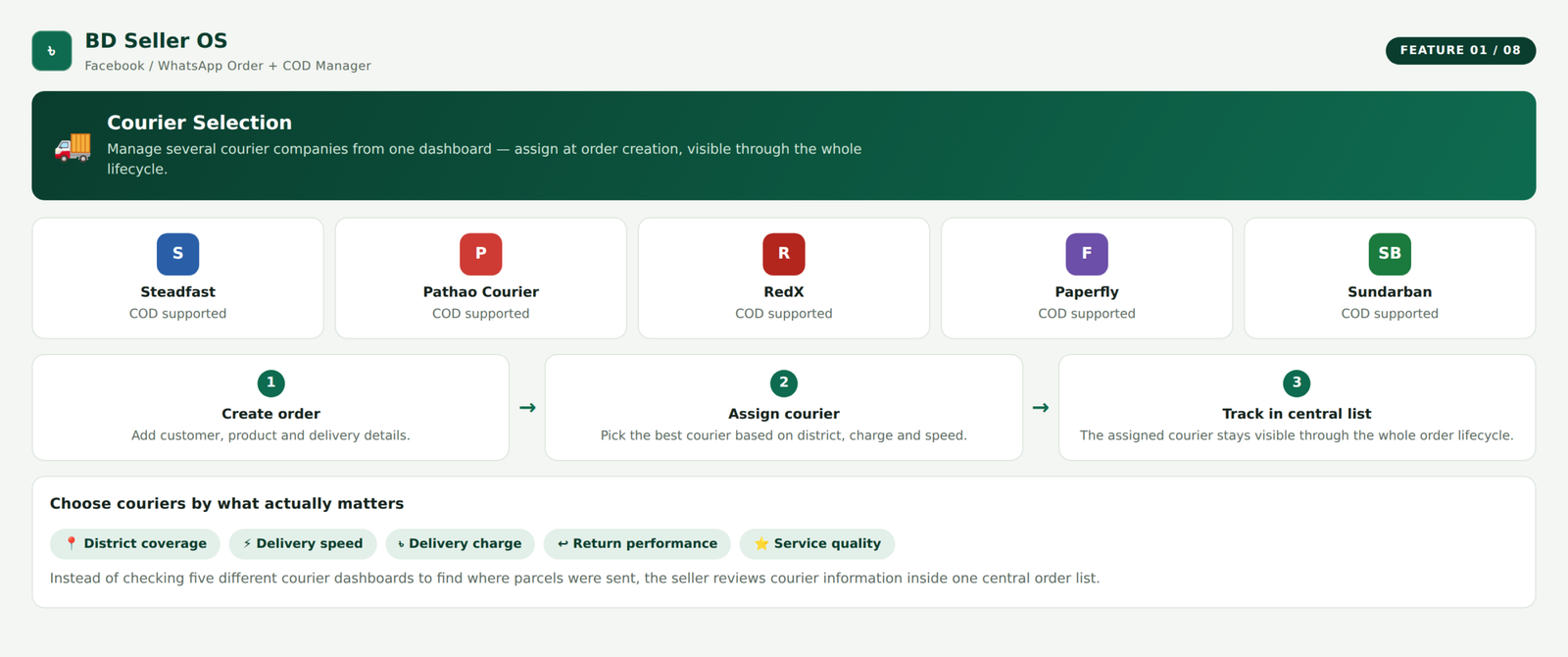
Courier Selection:
BD Seller OS supports the idea of managing several courier companies from one dashboard. The demo includes courier options such as:
- Steadfast
- Pathao Courier
- RedX
- Paperfly
- Sundarban Courier
The seller can assign a courier when creating the order. The assigned courier is then visible throughout the order lifecycle. This is useful for businesses that choose couriers based on district, delivery speed, charge, return performance, or service quality.
Instead of checking several courier dashboards to understand where parcels were sent, the seller can review courier information inside the central order list.
Automatic COD Calculation:
Cash on delivery is the main payment method for many social-commerce sellers in Bangladesh.
BD Seller OS calculates the exact amount that should be collected from the customer.
The COD amount includes:
- Product value
- Product quantity
- Delivery charge
The amount is displayed clearly on the order, confirmation message, and invoice.
This helps prevent situations where the courier is instructed to collect the wrong amount.
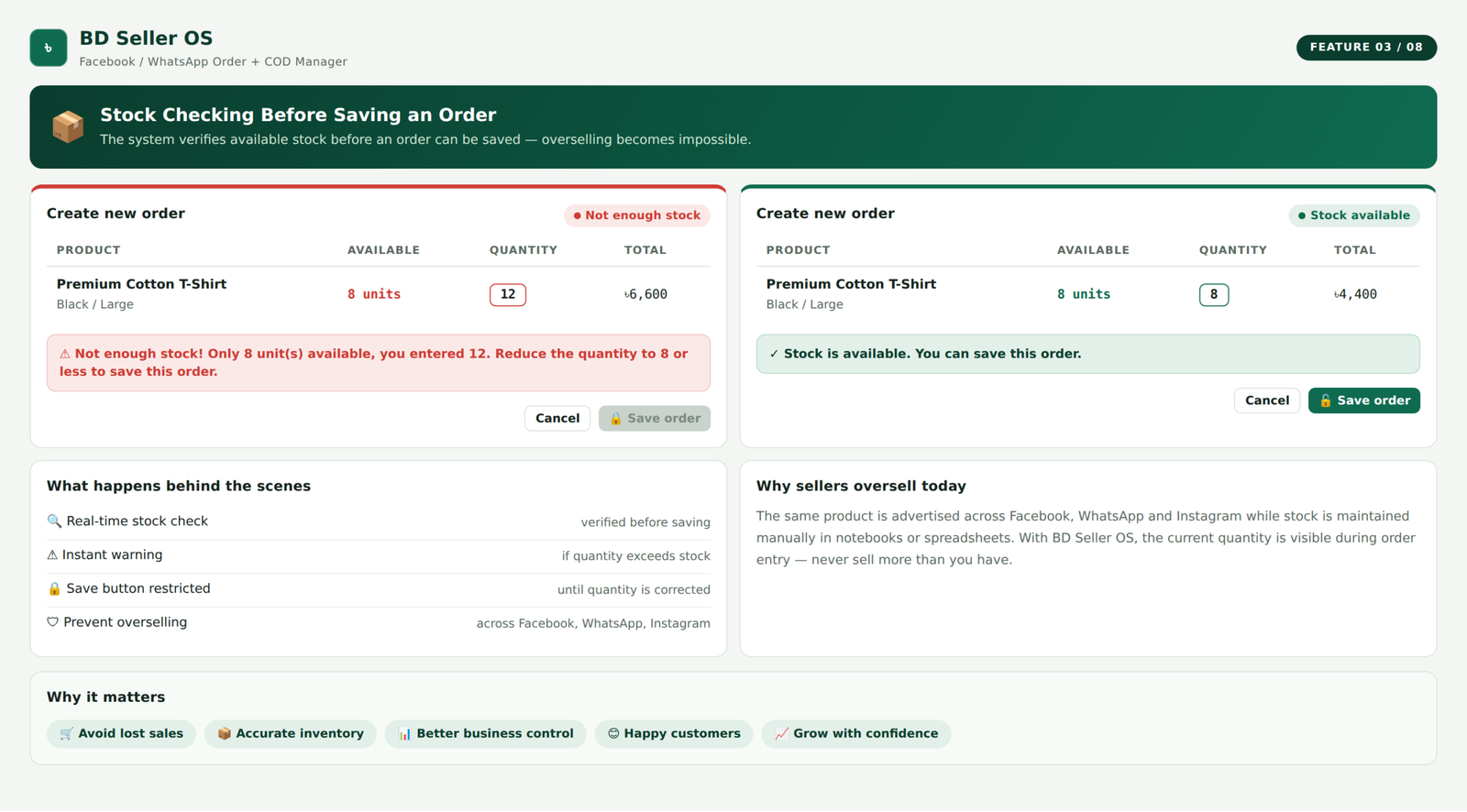
Stock Checking Before Saving an Order:
The system checks whether enough stock is available before an order is saved.
If a customer wants more units than are currently available, the seller receives a warning.
The save button can be restricted until the quantity is corrected.
This helps prevent overselling.
Overselling is a common problem for sellers who advertise the same product across Facebook, WhatsApp, Instagram, and other channels while maintaining stock manually.
With BD Seller OS, the current quantity is visible during order entry.
Key Features ofBD Seller OS Online Ai Enabled Software Platform:
Automatic Stock Deduction:
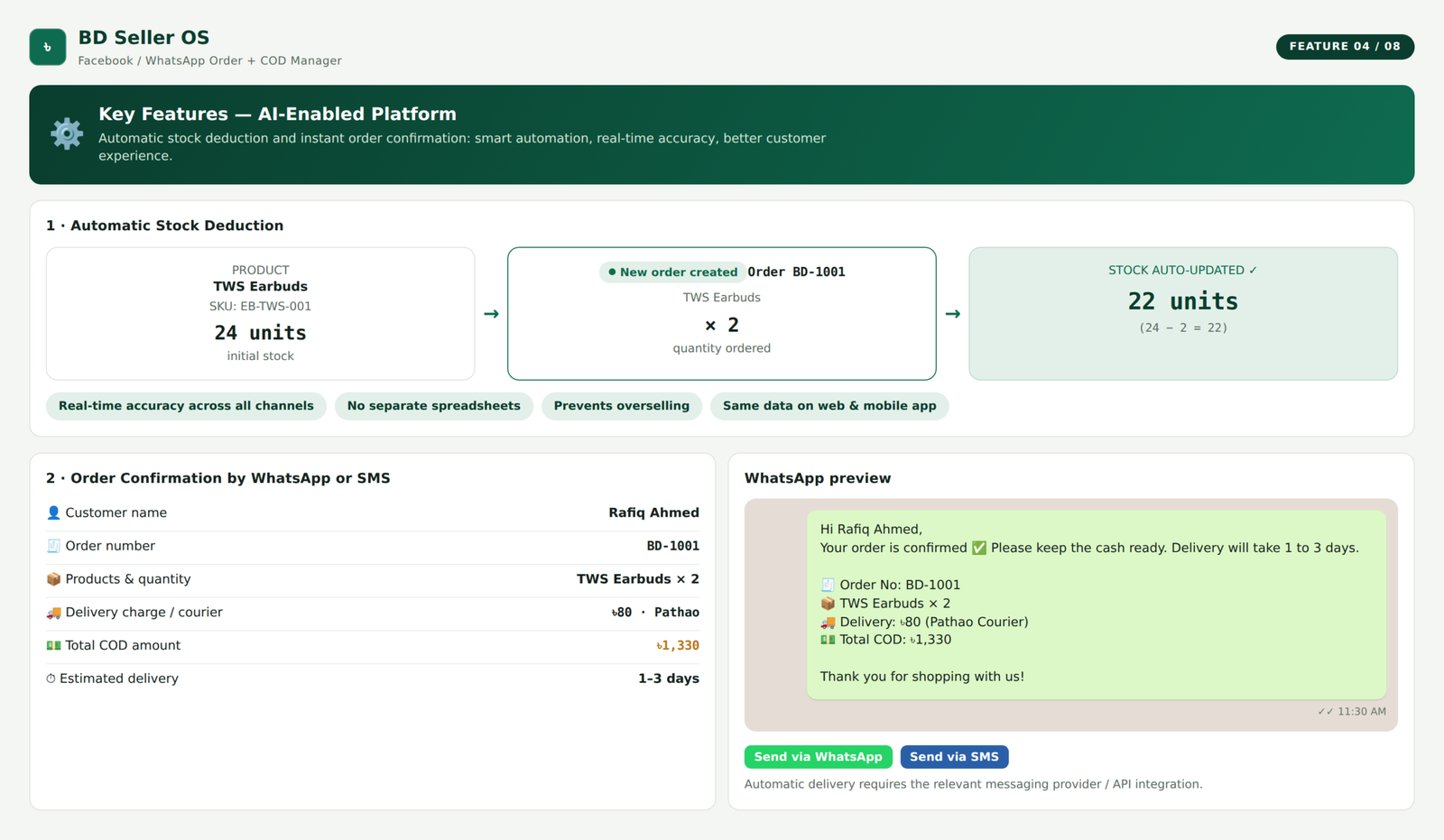
When a new order is created, the ordered quantity can be deducted from available stock. For example, if a product has 24 units and the seller creates an order for two units, the stock becomes 22. The seller does not need to update a separate spreadsheet. This keeps the product list and order system connected. The stock information displayed on the web dashboard and mobile app can use the same data.
Order Confirmation by WhatsApp or SMS:
After an order is saved, BD Seller OS can prepare a customer-confirmation message. The demo confirmation includes:
- Customer name
- Order number
- Ordered products
- Product quantities
- Delivery charge
- Courier name
- Total COD amount
- Estimated delivery time
A message may look like this: “Your order is confirmed. Please keep the cash ready. Delivery will take one to three days.”
This gives the customer a clear summary and reduces misunderstandings. The demo shows a WhatsApp message preview and sending action. Actual automatic delivery through WhatsApp or SMS would require the relevant messaging provider or API integration.
Order Status Management:
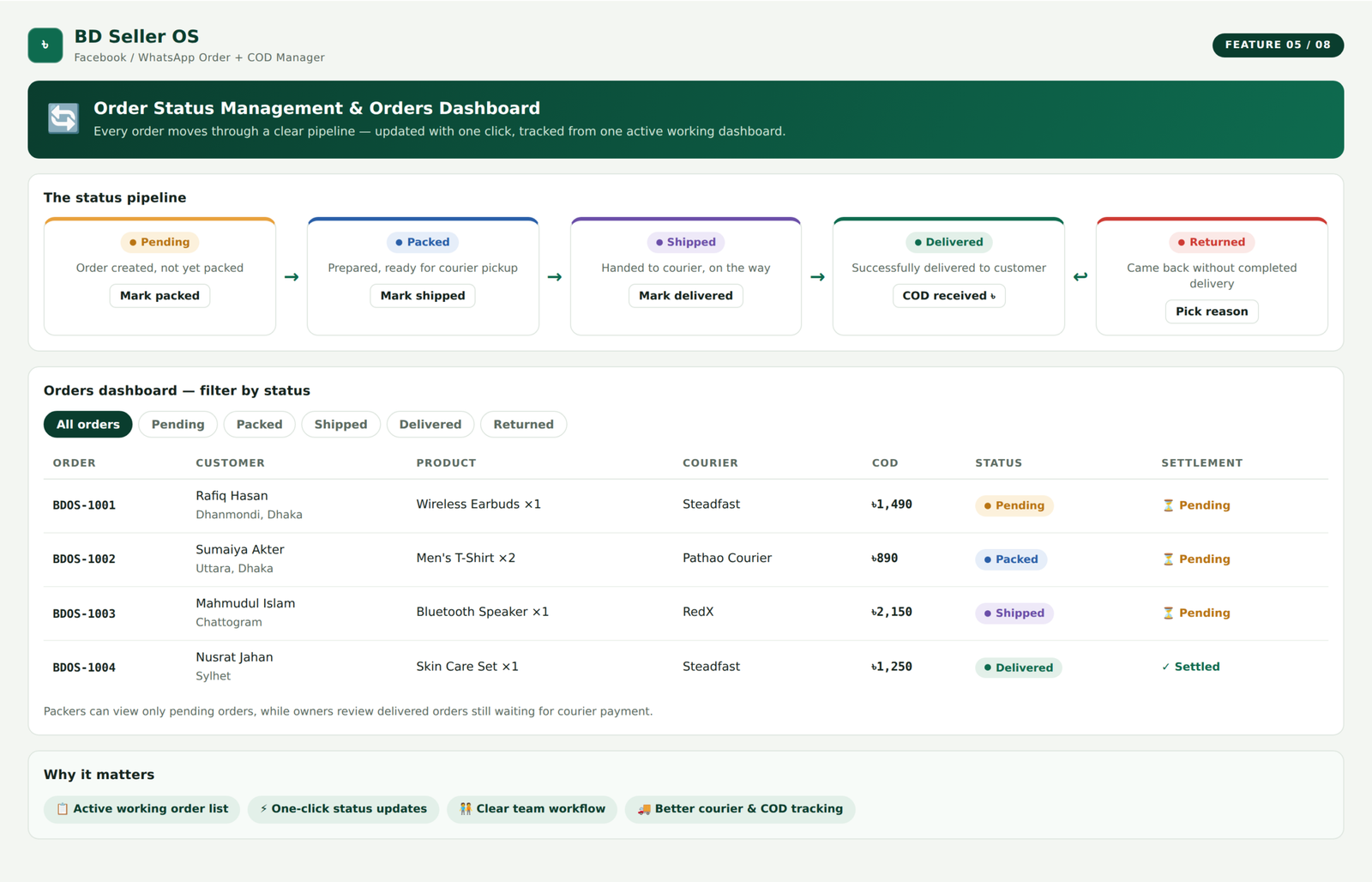
Every order moves through a clear status pipeline. The demo uses the following stages:
- Pending
- Packed
- Shipped
- Delivered
- Returned
Pending
The order has been created but has not yet been packed.
Packed
The products have been prepared and are ready for courier pickup.
Shipped
The parcel has been handed to the courier and is on the way to the customer.
Delivered
The courier has successfully delivered the parcel.
Returned
The parcel came back without a completed delivery. Each stage has a clear colour and action button. The seller or authorised employee can update the status without opening a separate page. This makes the order list an active working area rather than a passive record.
Orders Dashboard:
The orders page shows one organised row for every order. Each row can display:
- Order ID
- Order date
- Customer name
- Phone number
- Address
- Products
- Quantities
- Courier
- COD amount
- Delivery status
- COD settlement status
- Available actions
The seller can filter orders by status. For example:
- Show only pending orders
- Show only packed orders
- Show only shipped parcels
- Show delivered orders
- Show returned parcels
This helps employees focus on the tasks that require attention. A packer may only need to see pending orders. The owner may want to review delivered orders that are still waiting for courier payment.
COD Settlement Tracking:
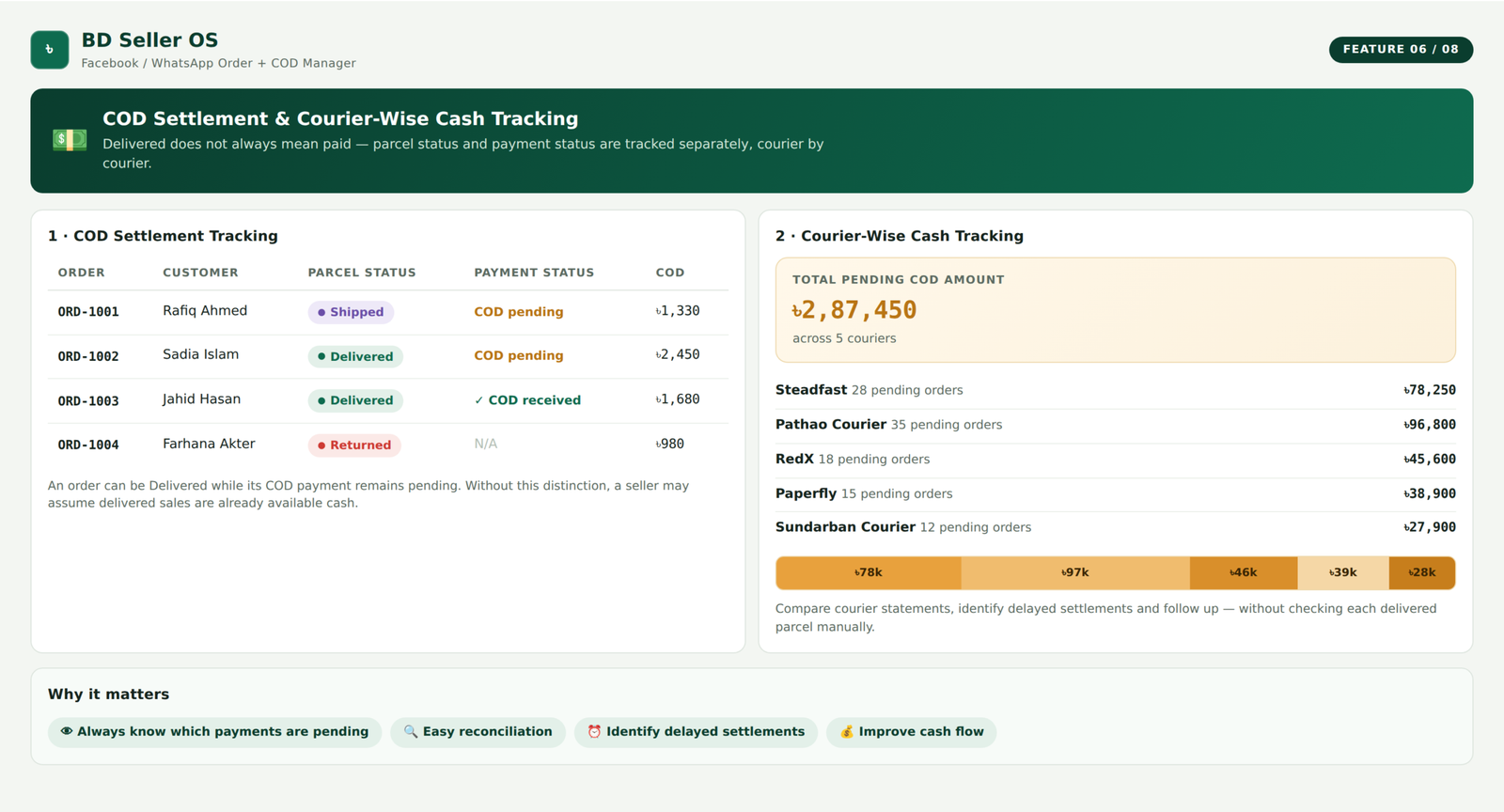
A delivered order does not always mean the seller has received the money.
The courier may deliver the parcel today and transfer the COD payment several days later.
This creates a difference between:
- Parcel status
- Payment status
BD Seller OS tracks these separately.
An order can be marked as delivered while its COD payment remains pending.
Once the courier pays the seller, the order can be marked as settled or COD received.
This distinction is extremely important.
Without it, a seller may assume that delivered sales have already become available cash.
Courier-Wise Cash Tracking:
One of the most important features in the demo is the cash lane.
It answers a simple question:
Where is the seller’s cash right now?
The system groups pending COD amounts by courier.
For example, it can show how much money is currently:
- With Steadfast
- With Pathao Courier
- With RedX
- With Paperfly
- With Sundarban Courier
The total pending amount appears clearly at the top.
This helps the seller compare courier statements and identify delayed settlements.
Instead of manually checking each delivered parcel, the owner can see the total amount owed by each courier.
COD Settlement Page:
The dedicated COD settlement page groups unpaid orders by courier. For each courier, the seller can see:
- Order number
- Customer name
- COD amount
- Parcel stage
- Total amount pending from that courier
Delivered orders that have not yet been paid can be marked as settled when the courier transfers the money. Parcels still in transit remain visible but cannot yet be settled.
This creates a clearer reconciliation process. The seller can compare the system total against the courier’s payment report before confirming settlement.
Dashboard for Daily Business Control:
The main dashboard gives the seller an immediate overview of the business. It can show:
- Today’s orders
- Total delivered orders
- Parcels currently on the road
- Number of returned orders
- Return rate
- Total COD pending
- Collected revenue
- Estimated profit
- Recent orders
- Best-selling products
- Low-stock products
The goal is to show the numbers the seller needs to check every day. Instead of opening separate order, stock, courier, and report files, the seller can begin from one screen.
Profit Estimate:
The demo includes an estimated profit calculation. It uses an example product-cost ratio to demonstrate how collected sales can be converted into an estimated profit value.
In a complete production system, each product should have its real purchase or production cost. Profit would then be calculated from:
Selling price − product cost − delivery expense − return expense − advertising cost − other operating expenses
The demo figure is an illustration rather than a full accounting calculation. However, the feature shows how the system can help sellers move beyond revenue and understand actual business performance.
Products and Stock Management:
The products section stores the seller’s catalogue. Each product can include:
- Product name
- Category
- Selling price
- Available quantity
- Stock level
- Low-stock status
The demo contains example categories such as:
- Cosmetics
- Clothing
- Gadgets
- Food
A visual stock bar makes it easier to recognise products with healthy or low quantities. Products with only a few units remaining can be marked with warnings such as:
- Low
- Restock soon
- Three left
- Six left
This helps the seller restock before advertising a product that is nearly unavailable.
Automatic Stock Restoration on Returns:
When an order is returned, the products may need to be added back to available stock. The demo automatically restores the returned quantity.
For example, if one smartwatch was deducted when the order was placed and the parcel later returns, the system can add one unit back.
This keeps stock more accurate.
In a production version, businesses may also need a condition check.
A returned product may be:
- Unopened and sellable
- Opened but reusable
- Damaged
- Missing an accessory
- Unsuitable for resale
The system could therefore support separate sellable and damaged-return quantities.
Return Reason Tracking:
Returned parcels are expensive. The seller may lose:
- Forward delivery charge
- Return delivery charge
- Packaging cost
- Employee time
- Advertising cost
- Product value if damaged
BD Seller OS records why an order was returned. The demo includes return reasons such as:
- Customer refused at the door
- Customer phone was unreachable
- Wrong or incomplete address
- Product damaged in transit
- Delivery was too late
Each return reason is added to the reports. This helps the seller identify repeated problems. For example, a large number of unreachable customers may suggest that phone verification is needed before shipping. A high number of incomplete addresses may indicate that the order form needs stronger address validation.
Customer Database:
Every order automatically helps build the customer database.
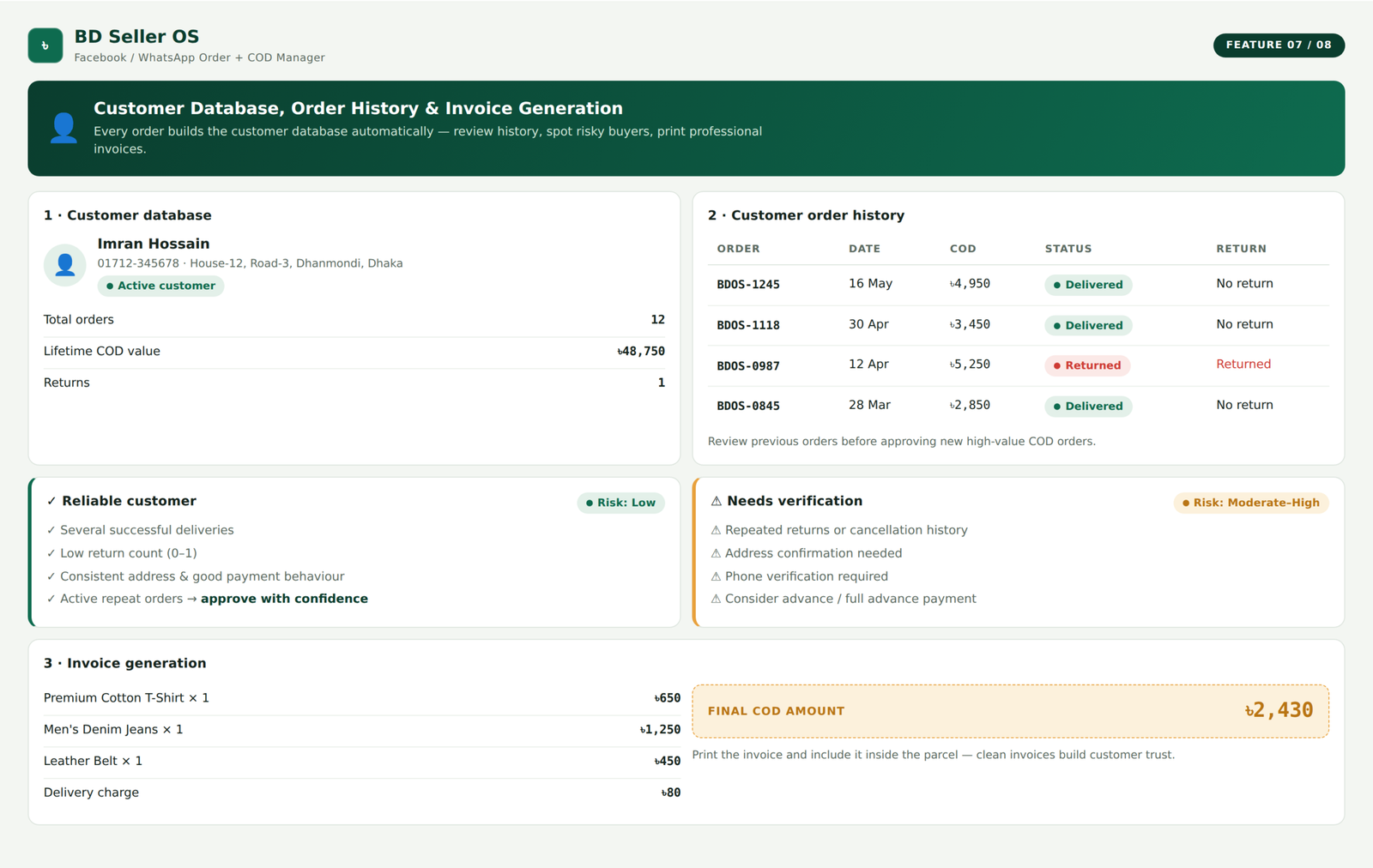
A customer record can contain:
- Name
- Phone number
- Address
- Total number of orders
- Lifetime COD value
- Number of returns
- Complete order history
This means the seller does not need to create customer records separately.
The database grows naturally as orders are entered.
Customer Order History:
The seller can open a customer’s history and see previous orders.
The history can show:
- Order number
- Order date
- COD amount
- Delivery status
- Return history
This is valuable when a repeat customer contacts the business.
The seller can quickly identify whether the person has successfully received previous orders or has a pattern of returns.
Customer history can support better decisions before approving high-value COD orders.
Recognising Repeat and Risky Customers:
Not every customer should be treated in exactly the same way.
A customer with several successful deliveries may be considered reliable.
A customer with repeated returns may require:
- Phone verification
- Advance delivery payment
- Full advance payment
- Address confirmation
- Order cancellation
BD Seller OS gives the seller access to the information needed to make that decision.
The system should not automatically label a customer unfairly. It should present the order history so the business can apply a consistent verification policy.
Invoice Generation:
The demo includes a printable invoice. The invoice contains:
- Seller name
- Seller contact information
- Invoice number
- Order date
- Customer name
- Phone number
- Delivery address
- Courier
- Payment method
- Product list
- Quantities
- Prices
- Delivery charge
- Final COD amount
The amount the courier must collect is highlighted clearly. The seller can print the invoice and include it inside the parcel. A professional invoice helps improve customer confidence and reduces packing mistakes.
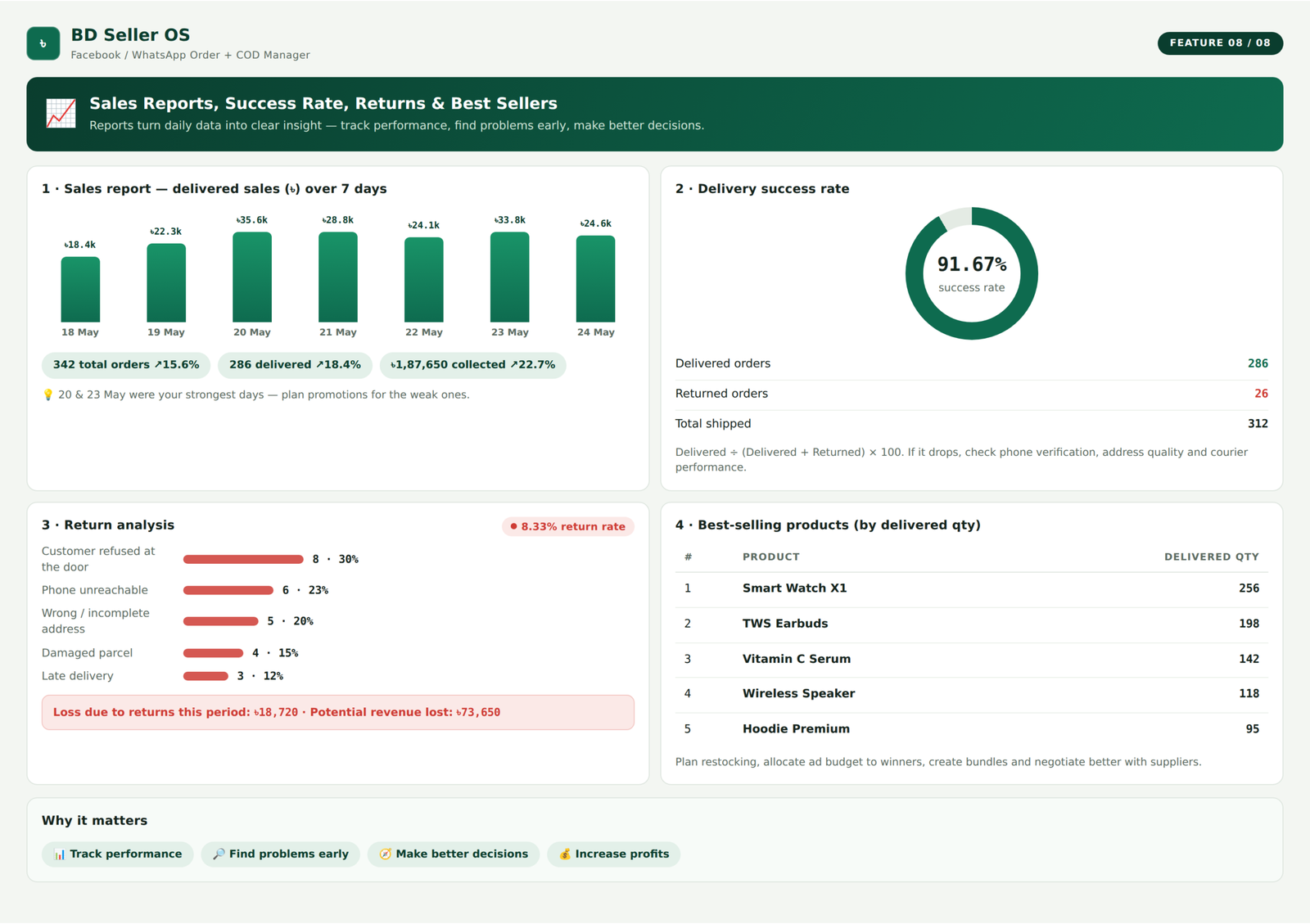
Sales Reports:
The reports section turns order activity into business information.
The demo includes a seven-day sales chart showing delivered value by date.
This helps the seller see:
- Strong sales days
- Weak sales days
- Changes in order volume
- Delivered revenue
- Weekly performance
The report can be extended to cover daily, weekly, monthly, or custom date ranges.
Delivery Success Rate:
Not all shipped parcels become completed sales.
The system compares delivered and returned orders to calculate a delivery success rate.
For example:
Delivered orders ÷ delivered plus returned orders × 100
A high success rate usually means fewer courier losses and more successful revenue.
A falling success rate may indicate issues with:
- Customer quality
- Advertisement targeting
- Phone verification
- Address quality
- Courier performance
- Delivery speed
- Product expectations
This makes delivery success one of the most important performance indicators for COD sellers.
Return Analysis:
The return report groups returned parcels by reason.
Instead of simply seeing the total number of returns, the seller can understand the cause.
For example:
- Customer refused
- Phone unreachable
- Wrong address
- Damaged parcel
- Late delivery
This allows the business to address the root problem.
A seller could decide to verify every order by phone, stop using a poorly performing courier in a certain area, improve product descriptions, or request an advance delivery charge from high-risk customers.
Best-Selling Product Report:
The dashboard identifies products with the highest delivered quantities.
This helps the seller understand what customers are actually buying.
Best-seller information can guide:
- Restocking
- Advertisement budgets
- Product photography
- Bundle creation
- Supplier negotiations
- Seasonal campaigns
A product receiving many enquiries may not always be the product generating the most completed deliveries. The order system provides a more reliable view than social-media engagement alone.
Frequently Asked Questions
What is BD Seller OS?
BD Seller OS is a web and mobile order-management system for Facebook, WhatsApp, and COD-based sellers in Bangladesh.
Does it calculate the COD amount?
Yes. It adds the product subtotal and delivery charge to calculate the final amount the courier should collect.
Does the system track courier payments?
Yes. Delivered orders can remain marked as COD pending until the courier pays the seller.
Can it prevent overselling?
Yes. It warns the seller when an ordered quantity exceeds available stock.
Can I print invoices?
Yes. The demo includes a printable invoice with customer, product, courier, delivery, and COD information.
Can I see why orders are being returned?
Yes. The reports group returns by reasons such as unreachable phone, customer refusal, incorrect address, damage, or late delivery.
Can employees have limited access?
Yes. The platform includes owner, manager, and packer role concepts with different permissions.
Can I create orders from Facebook messages?
Yes. The order form is designed for quickly copying customer information from Messenger or WhatsApp. Direct automatic extraction would require API integration.
Can I use multiple courier companies?
Yes. Orders can be assigned to different couriers, and pending cash can be grouped by courier.
Does stock update automatically?
The demo deducts stock when an order is created and restores it when an order is returned.
Can customers receive order confirmations?
The system can prepare a WhatsApp or SMS confirmation containing products, delivery charge, courier, and COD amount. Sending automatically requires a messaging integration.
Can it track returned orders?
Yes. Returned orders can be recorded with a return reason, and the product quantity can be restored to stock.
Does it store customer history?
Yes. The customer section displays previous orders, lifetime COD value, and returns.
Is there a mobile version?
Yes. The demo includes a mobile interface for orders, stock, COD tracking, and order-status updates.
