

Import and Wholesale Dealer ERP Software
Importers, distributors, and wholesale businesses often grow faster than their internal systems. At the beginning, a business may manage stock in Excel, record dealer dues in a paper khata, receive orders by phone, prepare challans manually, and depend on sales representatives to report collections at the end of the day.
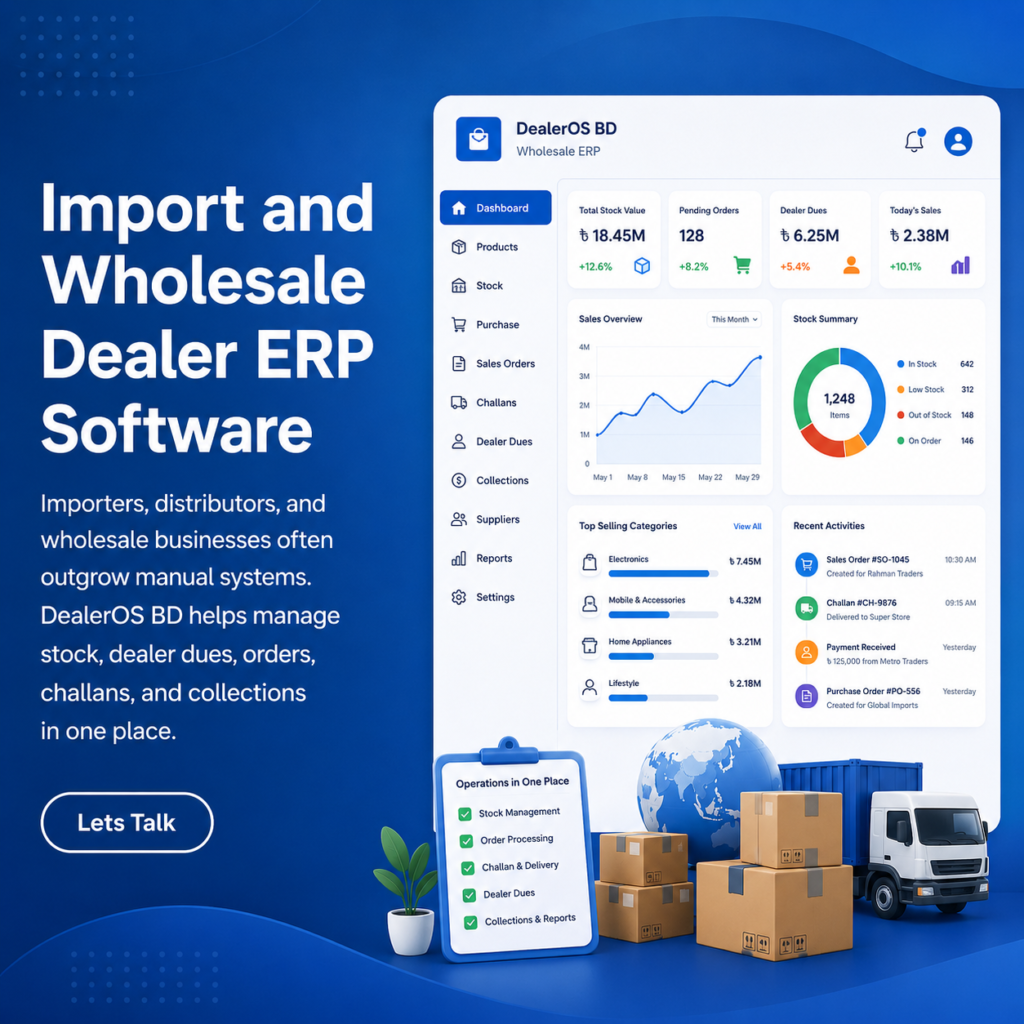
We're here to build your very own E-commerce Platform

Transform your digital storefront with our all-in-one E-commerce solution, streamlining sales, inventory management, and customer engagement for optimal growth.


Import and Wholesale Dealer ERP Software:
What Is Import and Wholesale Dealer ERP Software?
Importers, distributors, and wholesale businesses often grow faster than their internal systems.
At the beginning, a business may manage stock in Excel, record dealer dues in a paper khata, receive orders by phone, prepare challans manually, and depend on sales representatives to report collections at the end of the day.
This process may work when the business has a small number of products and dealers. However, it becomes difficult to control when the company starts managing multiple warehouses, hundreds of products, several sales representatives, dealer credit limits, imported shipments, partial payments, returns, and outstanding dues.
DealerOS BD is designed to bring these operations into one connected system.
It is an import and wholesale dealer ERP platform built around the way distribution businesses operate in Bangladesh. It combines a web-based administration platform with a mobile application for field sales representatives.
The system is designed to manage the complete business cycle:
Import or purchase → stock entry → dealer order → warehouse confirmation → delivery challan → dealer due → payment collection → profit reporting
Instead of maintaining separate Excel files, paper records, WhatsApp messages, and phone-call notes, DealerOS BD gives the owner, office team, warehouse, accounts department, and field sales team access to the same business information.
What Is DealerOS BD?
DealerOS BD is an enterprise resource planning system for importers, wholesalers, distributors, and dealer-based businesses. It acts as a central operating system for the company. The platform can organise:
- Products and warehouse stock
- Dealer information
- Sales representative assignments
- Dealer orders
- Credit limits
- Delivery challans
- Import and landed-cost calculations
- Dealer dues
- Payment collections
- Returns and damaged goods
- Profit margins
- Area-wise sales
- Sales representative performance
- Business reports
The product demonstration includes a web administration platform, an Android or iOS sales representative experience, and an interactive user-flow section. The web platform is primarily designed for business owners, office staff, accounts teams, and warehouse employees. The mobile application is designed for sales representatives working in shops, markets, dealer locations, and distribution areas.
Why Wholesale Businesses Need a Central ERP System?
Wholesale businesses usually handle several connected transactions.
A product is purchased locally or imported. It is received into a warehouse. A dealer places an order. The warehouse confirms the stock. A challan is prepared. The dealer receives the goods. The invoice value is added to the dealer’s due balance. A sales representative later collects a partial or full payment.
When each part is handled in a different file or notebook, mistakes become more likely.
The stock sheet may show products that have already been reserved for another order. A sales representative may accept an order from a dealer who has crossed the credit limit. A payment may be collected but not entered into the ledger immediately. A returned product may be credited manually without adjusting stock.
DealerOS BD is designed to connect these activities.
When one department updates a transaction, the related information can become visible to other authorised users.
For example, when a sales representative submits an order, the warehouse can see it. When a challan is issued, the dealer ledger can be updated. When a payment is collected, the owner can see the collection on the dashboard.
The DealerOS BD Web Platform in Details:
The web platform is the main control centre for the business. It provides a structured administration interface where owners and employees can monitor operations, create records, review transactions, and generate reports. The demo groups the web platform into four main business areas:
Operations
This includes the dashboard, products, stock, dealers, sales orders, and delivery challans.
Money
This includes import costing, dealer due ledgers, and payment collections.
Business insight
This includes sales reports, profit margins, area performance, and product performance.
Control and adjustment
This includes product returns, damaged goods, stock corrections, and supplier claims.
Key Benefits of DealerOS BD:
Business Dashboard:
The dashboard gives the owner a summary of current business performance. Instead of opening several files, the owner can review important numbers from one screen. The dashboard can display information such as:
- Today’s sales
- Total dealer dues
- Overdue balances
- Current stock value
- Number of products or SKUs
- Low-stock alerts
- Recent sales orders
- Order statuses
- Area-wise sales performance
The purpose of the dashboard is to help the owner understand what is happening without waiting for verbal updates from each department. A business owner can quickly see whether sales are increasing, which dealers owe the most money, which products need to be reordered, and which orders are waiting for challans or delivery.
Products and Multi-Warehouse Stock:
DealerOS BD includes a product and stock-management module. Each product can have information such as:
- Product name
- SKU
- Product category
- Import or purchase source
- Quantity by warehouse
- Minimum stock level
- Landed cost
- Wholesale price
- Profit margin
- Stock status
The demo shows stock divided between a main warehouse and a regional depot. This is important for distributors operating from more than one location. Instead of seeing only the company’s total stock, users can see the quantity available in each warehouse. For example, a product may have enough total stock across the company but very little stock in the Chattogram depot. DealerOS BD can highlight that location-specific shortage.
This helps the business decide whether to transfer stock, reorder products, or restrict new orders from a specific area.
Automatic Low-Stock Alerts:
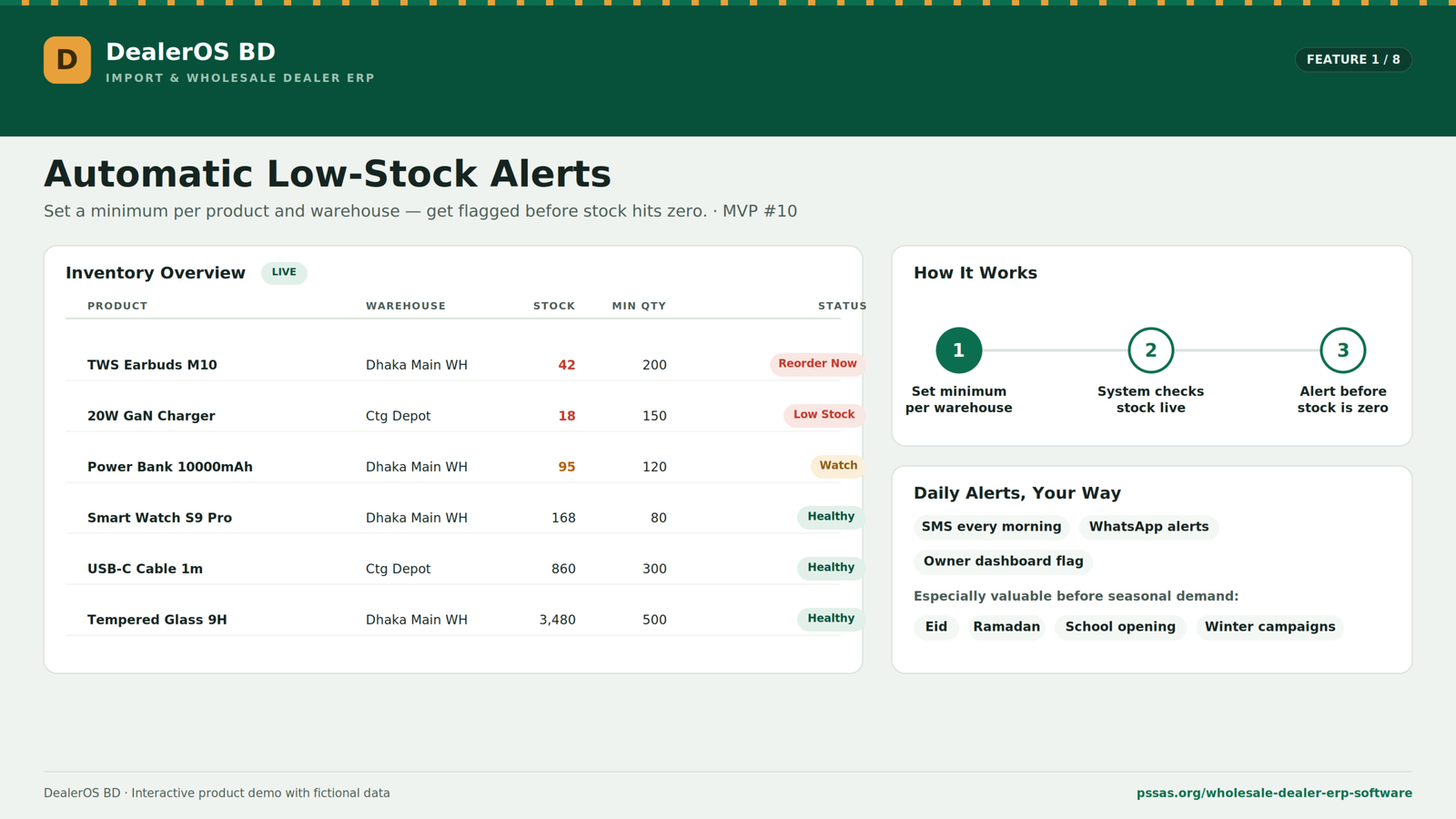
Wholesale businesses can lose sales when popular products run out unexpectedly. DealerOS BD allows a minimum quantity to be set for each product and warehouse. When stock falls below that level, the system can flag the product as:
- Watch
- Low stock
- Reorder now
- Healthy
This provides an early warning before the stock reaches zero.
A business could also connect these alerts to daily notifications through channels such as SMS or WhatsApp, depending on the final implementation. Low-stock monitoring is especially valuable before seasonal demand periods such as Eid, Ramadan, school openings, winter campaigns, or major promotional events.
Dealer Database:
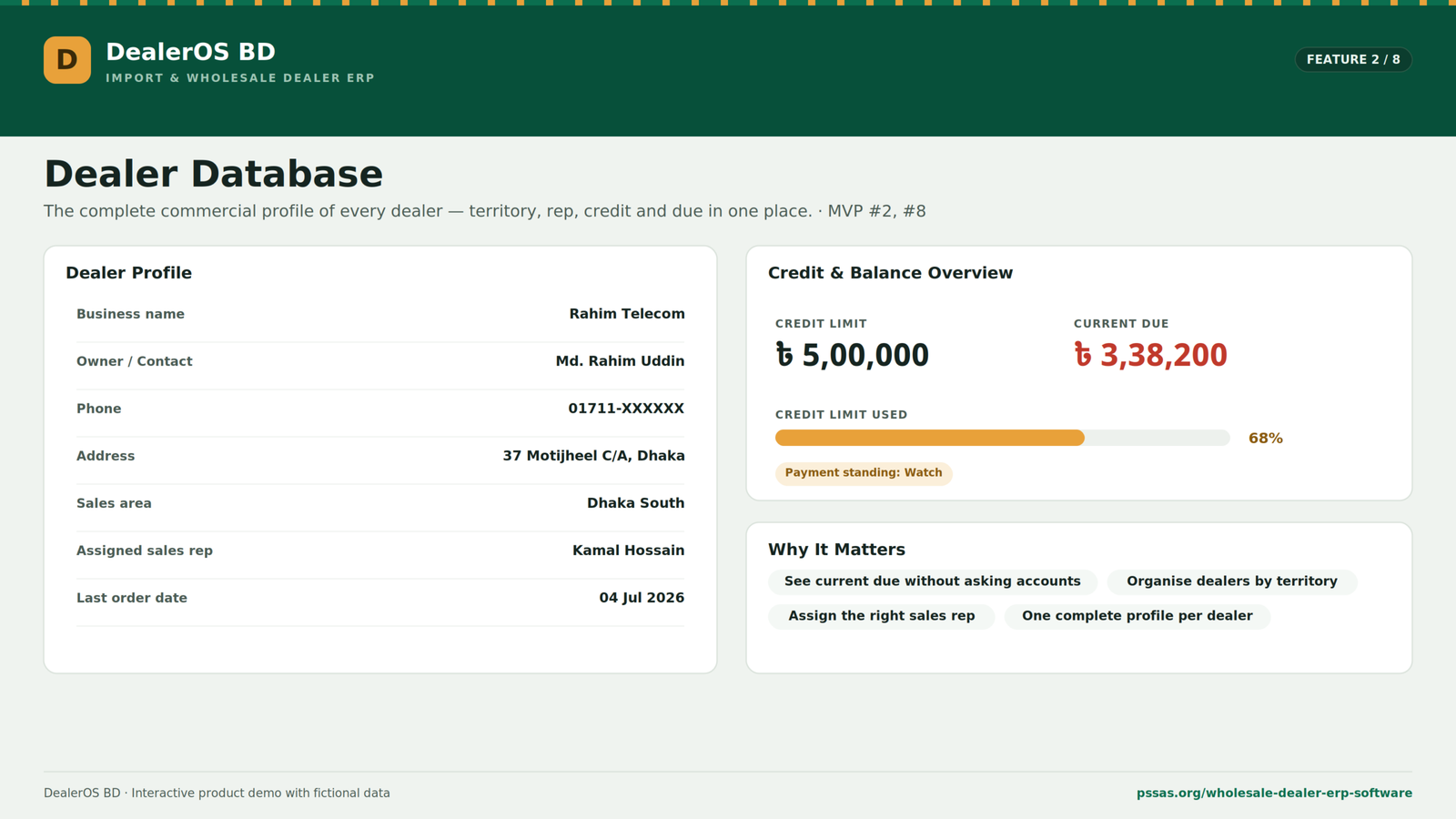
The dealer database stores the commercial relationship between the distributor and each dealer. A dealer record can include:
- Business name
- Owner or contact person
- Phone number
- Address
- Sales area
- Assigned sales representative
- Credit limit
- Current outstanding balance
- Percentage of credit limit used
- Payment standing
- Last order date
This creates a complete dealer profile. Instead of asking the accounts department for a dealer’s balance, a salesperson or authorised employee can see the current due directly from the system. The dealer database also helps the company organise dealers by territory and assign responsibility to the correct sales representative.
Dealer Credit Limits:
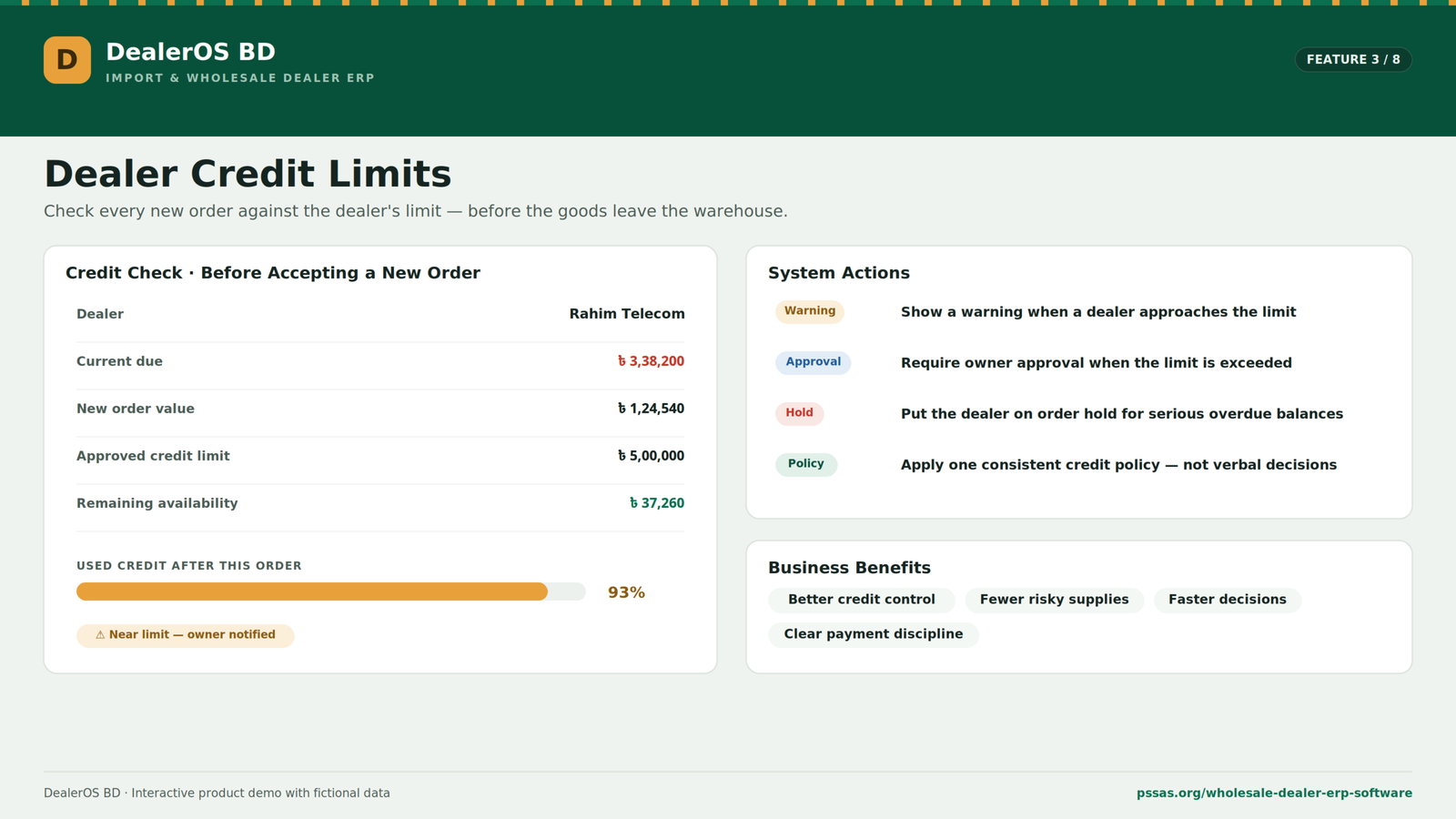
Credit control is one of the most important parts of a wholesale business. Many dealers receive goods on credit and pay through several partial collections. Without a clear credit-control process, the company may continue supplying products to dealers who already owe a large amount. DealerOS BD allows the business to set a credit limit for each dealer.
Before accepting a new order, the system can compare:
- Current due
- New order value
- Approved credit limit
- Remaining credit availability
When a dealer approaches or exceeds the limit, the system can show a warning or require approval from the owner. A dealer with a serious overdue balance may be placed on order hold until a payment is received. This creates a consistent credit policy instead of depending only on verbal decisions.
Sales Order Management:
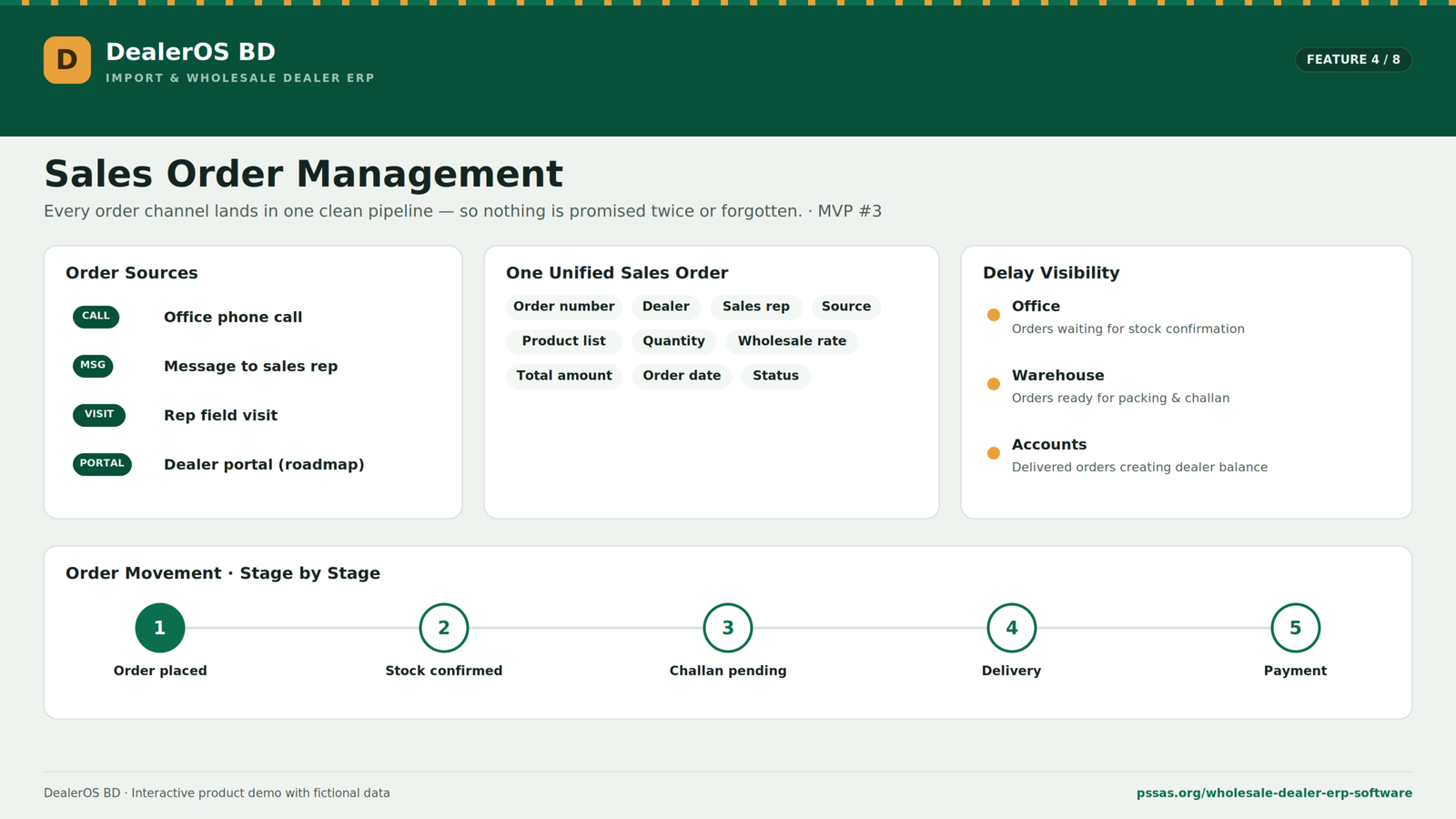
Dealer orders may come from several sources. A dealer may call the office, send a message to a sales representative, place an order during a field visit, or eventually use a dealer portal. DealerOS BD brings these orders into one sales pipeline. Each sales order can contain:
- Order number
- Dealer name
- Assigned sales representative
- Order source
- Product list
- Quantity
- Wholesale rate
- Total amount
- Order date
- Current order status
An order can move through stages such as: Order placed → stock confirmed → challan pending → delivery → payment
This makes it easier to identify delays. The office can see which orders are waiting for stock confirmation. The warehouse can see which orders need packing. The accounts team can see which delivered orders created a new dealer balance.
Warehouse Stock Confirmation:
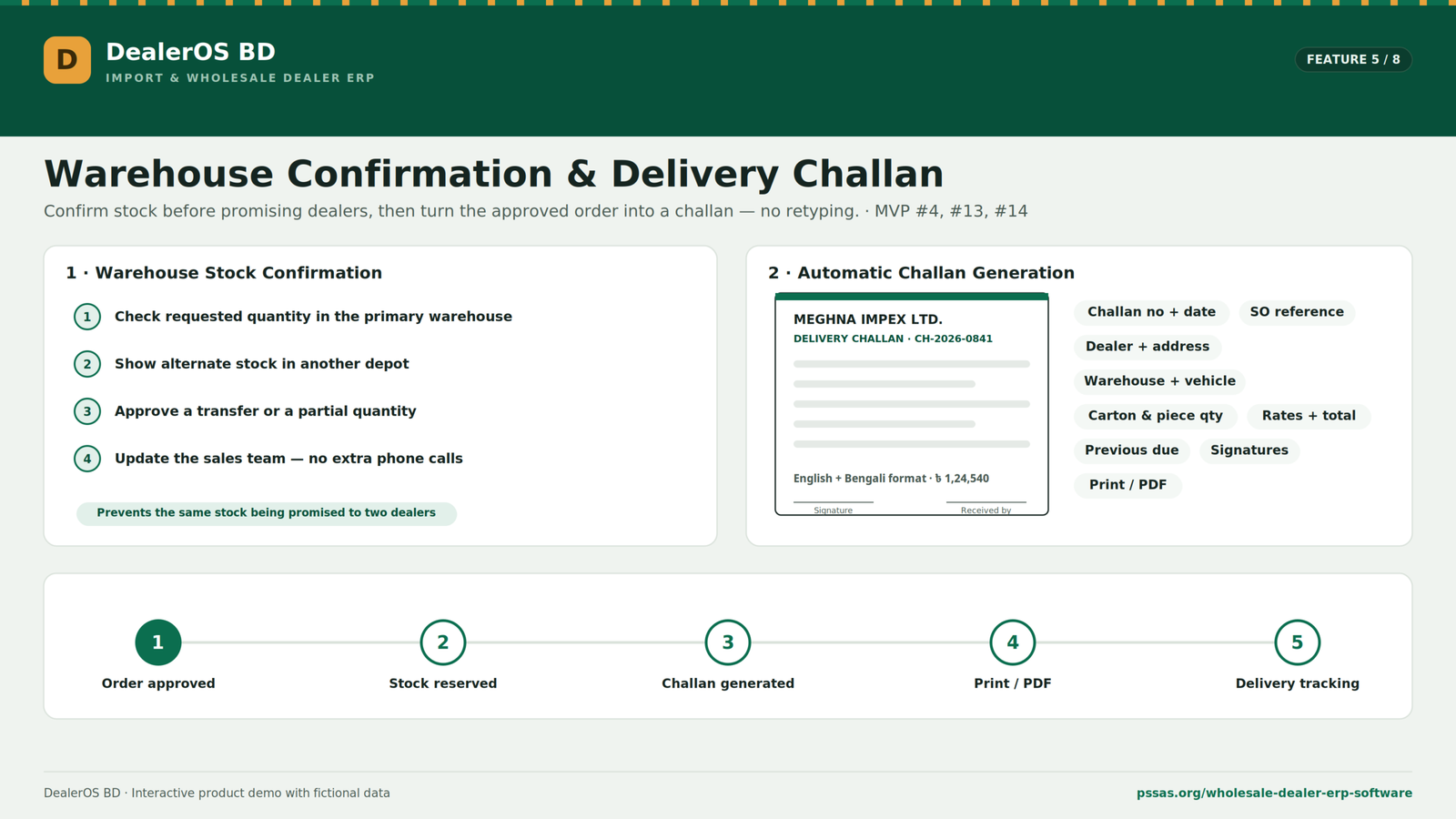
An order should not be promised to a dealer until the stock has been confirmed. DealerOS BD allows the warehouse to check availability before reserving products. This can prevent the same stock from being promised to two different dealers. When the primary warehouse does not have enough stock, the system can show stock available in another warehouse or depot. The warehouse team can then arrange a transfer, approve a partial quantity, or inform the sales team about the shortage. This reduces the number of phone calls between the sales representative, office, and warehouse.
Automatic Delivery Challan Generation:
Once an order is confirmed, DealerOS BD can turn it into a delivery challan. The challan can include:
- Company name and address
- Challan number
- Date
- Sales order reference
- Dealer name and delivery address
- Warehouse
- Vehicle information
- Sales representative
- Product descriptions
- Carton quantities
- Piece quantities
- Rates
- Total value
- Previous dealer due
- Signature sections
The document can be printed or prepared as a PDF. It can also be formatted with English and Bengali information, which is helpful for local warehouse and delivery operations. Because the challan is generated from the approved sales order, employees do not need to type the product list again. This reduces duplicate work and helps prevent quantity or pricing mistakes.
Purchase and Import Costing:
Import businesses need to know more than the supplier’s invoice price. The true cost of a product may include:
- Supplier invoice value
- Customs duty
- Value-added tax
- Advance income tax
- Freight charges
- Clearing and forwarding charges
- Port expenses
- Transportation
- Insurance
- Other landing expenses
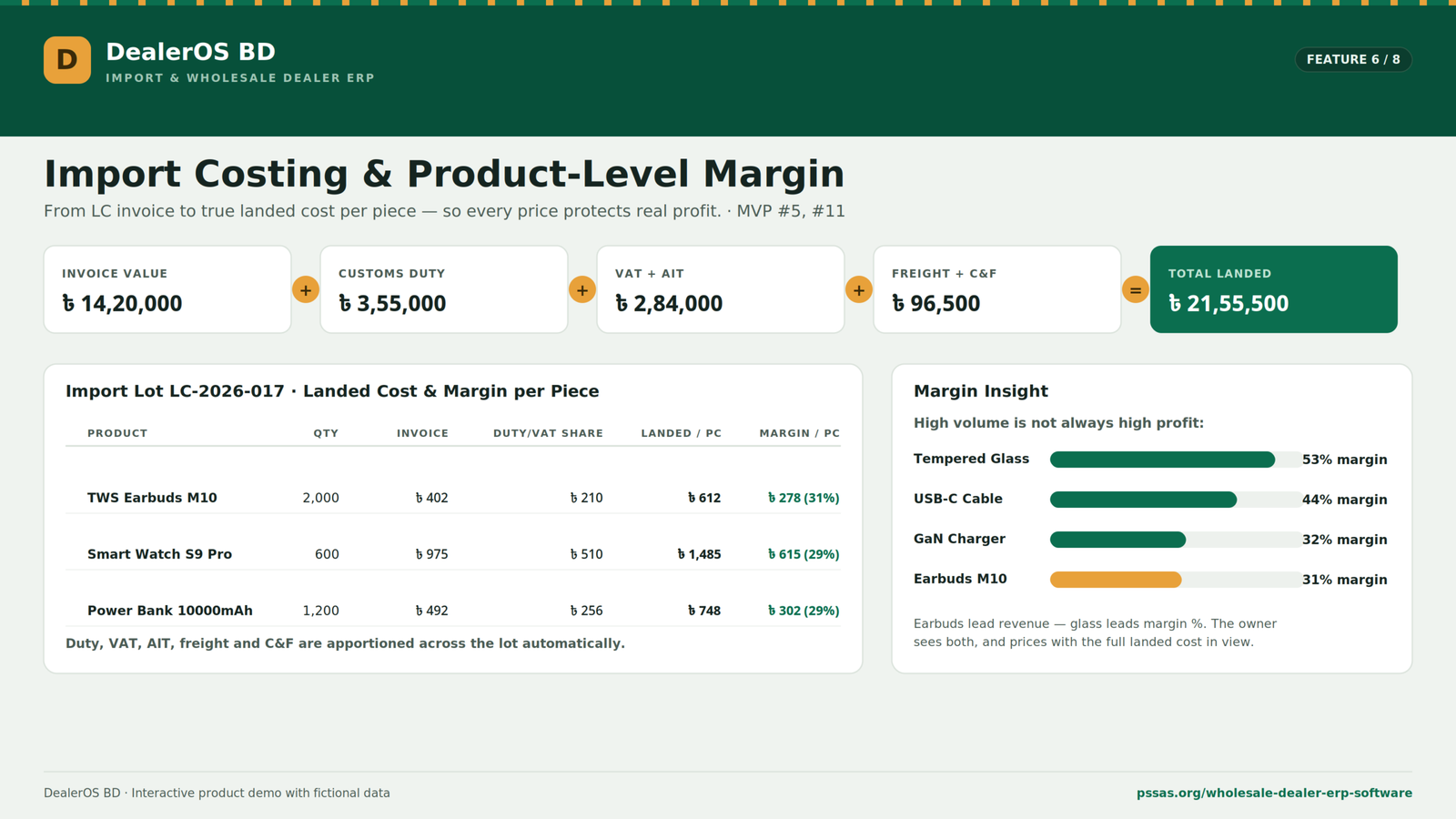
DealerOS BD is designed to combine these expenses and calculate the landed cost of each product. For example: Invoice cost + customs duty + VAT and AIT + freight and C&F = total landed cost. The total cost can then be allocated across the products in the imported lot.
This gives the business a more accurate landed cost per unit. Without proper landed costing, a wholesaler may set a selling price based only on the supplier invoice and unknowingly reduce the actual profit margin.
Product-Level Profit Margin:
Once the landed cost is available, DealerOS BD can compare it with the wholesale selling price. The system can calculate:
- Landed cost per product
- Wholesale selling price
- Profit amount per unit
- Profit-margin percentage
- Total revenue
- Total profit by product
This helps the company understand which products generate healthy margins and which products need price adjustments. A product with high sales volume may not always be the most profitable. Another product with lower volume may generate a stronger percentage margin. The reports allow the owner to evaluate both sales and profitability.
Digital Dealer Due Ledger:
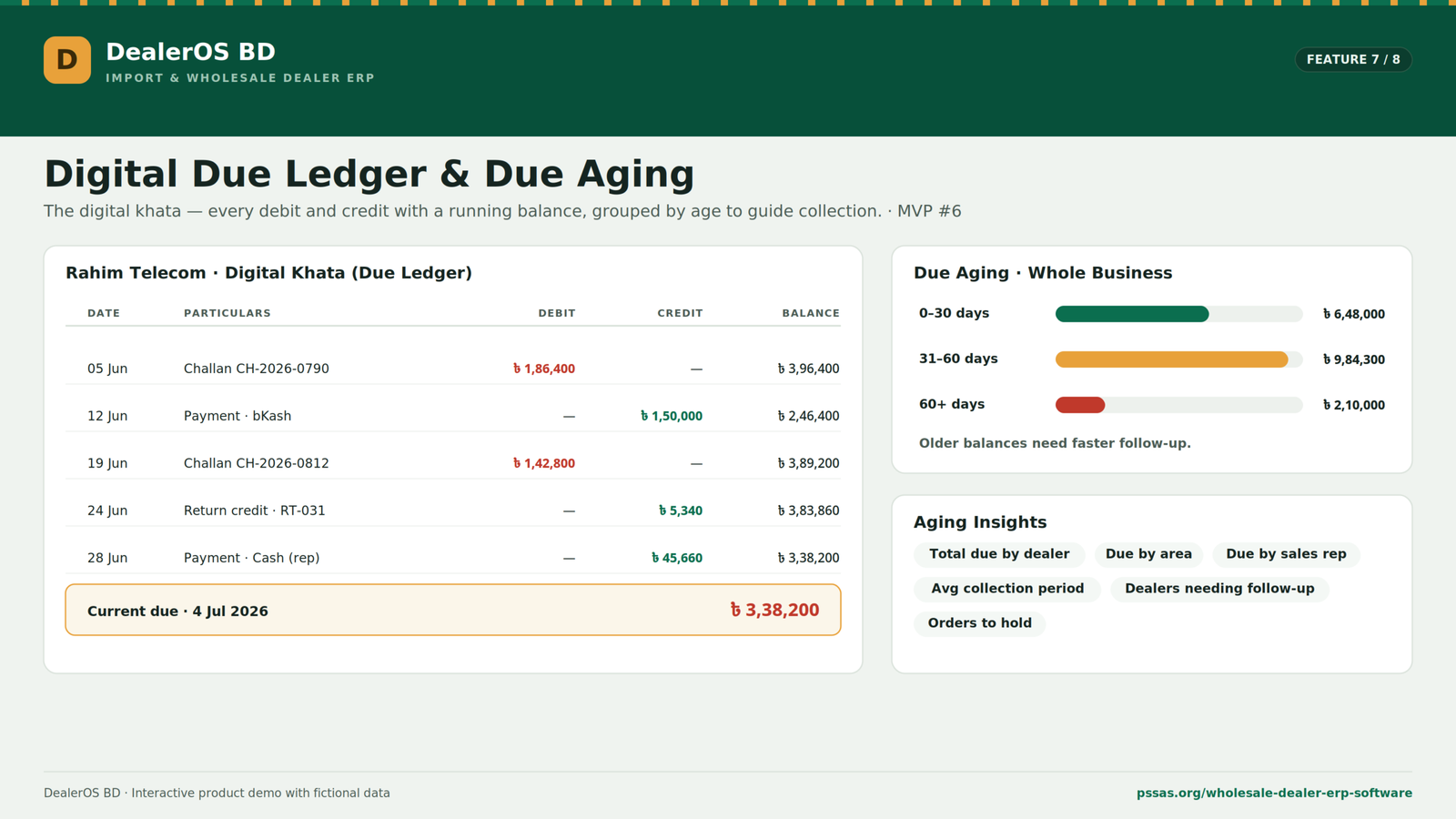
The due-ledger module works like a digital khata.
Every debit and credit is recorded with a running balance.
A dealer’s ledger can include:
- Opening balance
- Challan debits
- Cash payments
- bKash payments
- Nagad payments
- Bank transfers
- Cheque payments
- Return credits
- Adjustment entries
- Current balance
When a challan is issued, the order value can be added to the dealer’s balance.
When a payment is recorded, the balance can be reduced.
When products are returned and approved, the relevant amount can be credited.
This creates a transaction history that can be checked by the owner, accounts team, and authorised sales representatives.
Due Aging:
Not all outstanding balances carry the same risk.
A recent balance may be part of the dealer’s normal credit cycle. A balance that has remained unpaid for several months requires more attention.
DealerOS BD can divide dues into aging groups such as:
- 0–30 days
- 31–60 days
- More than 60 days
This allows the owner to identify older balances.
The system can also show:
- Total due by dealer
- Total due by area
- Due assigned to each sales representative
- Average collection period
- Dealers requiring follow-up
- Dealers whose new orders should be held
Aging information helps the company prioritise collection activity.
Payment Collection Management:
Sales representatives often collect payments while visiting dealers.
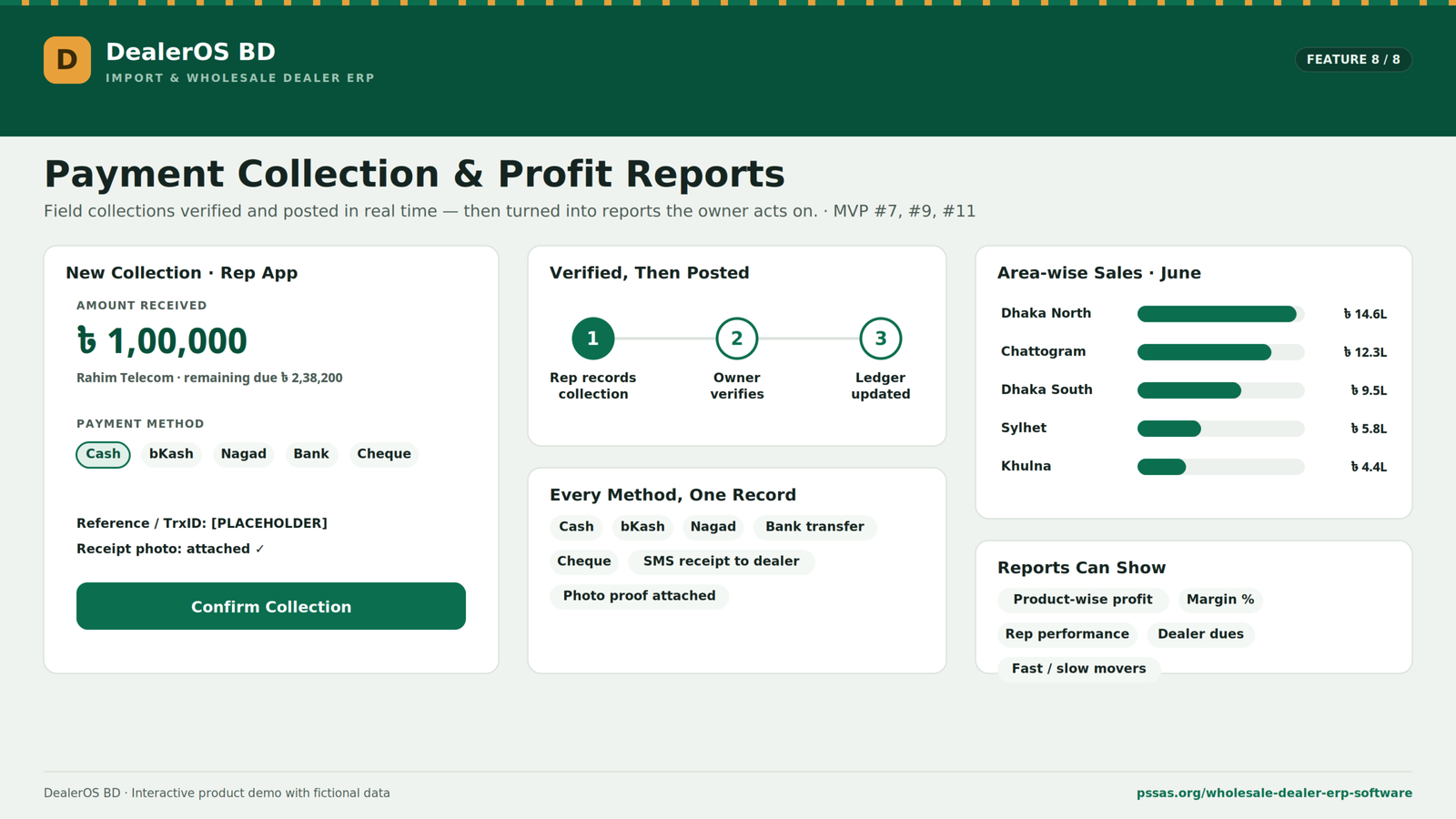
DealerOS BD allows these collections to be recorded directly through the mobile application.
Supported collection methods may include:
- Cash
- bKash
- Nagad
- Bank transfer
- Cheque
The representative can enter the amount, select the payment method, add a transaction reference, and attach a photo of the receipt or supporting document.
After submission, the collection can be shown to the office or owner for verification.
The dealer ledger can then be updated with the payment.
A payment receipt can also be sent to the dealer by SMS, depending on the final integration.
This creates a clearer record than reporting the day’s collection through a phone call or handwritten note.
Reports and Profit Analysis:
DealerOS BD includes reporting features for sales, products, areas, margins, and field performance.
Reports can show:
- Product-wise sales
- Product-wise revenue
- Product-wise profit
- Margin percentage
- Area-wise sales
- Sales representative performance
- Dealer-wise dues
- Collection performance
- Warehouse stock value
- Fast-moving products
- Slow-moving products
- Monthly targets
The area-wise report helps the owner understand where the business is growing.
For example, sales in Dhaka North can be compared with Chattogram, Dhaka South, Sylhet, Khulna, or Mymensingh.
The business can then adjust sales targets, marketing activity, stock allocation, and sales-representative coverage.
Returns and Damaged Goods:
Product returns and damaged goods can affect stock, dealer balances, supplier relationships, and company profit.
DealerOS BD provides a structured return and damage log.
A return record can include:
- Return reference
- Date
- Dealer or warehouse source
- Product
- Quantity
- Reason
- Credit value
- Required action
Reasons may include:
- Dead on arrival
- Charging fault
- Broken in transit
- Damaged packaging
- Defective battery
- Incorrect product
- Supplier manufacturing issue
The system can record whether the product was:
- Credited to the dealer ledger
- Written off
- Returned to stock
- Sent for repair
- Submitted as a supplier claim
Over time, this information can help the business measure defect rates by product or supplier.
That data may also help during future supplier negotiations.
The DealerOS BD Sales Representative App:
The mobile application is designed for field sales representatives.
A representative can use the app while visiting dealer shops, travelling through sales areas, collecting payments, and creating orders.
The app includes four main working areas:
- Home
- Order
- Collect
- Dealers
Mobile Home Screen:
The home screen can display:
- Monthly sales target
- Target achievement percentage
- Total due in the assigned area
- Today’s dealer route
- Scheduled visits
- Collection tasks
- Delivery tasks
- Warehouse-stock alerts
This gives the representative a clear plan for the day.
Instead of calling the office for every detail, the representative can see which dealers need visits, who has outstanding dues, and what stock is available.
Creating an Order at the Dealer’s Shop:
The representative can select a dealer, add products, adjust quantities, and review the total order value directly from the mobile app.
Before submission, the app can check:
- Current dealer due
- Credit limit
- Available credit
- Product stock
- Warehouse availability
This allows the representative to identify a credit or stock issue while still standing in the dealer’s shop.
The order can then be submitted to the warehouse or office.
Collecting Payments from the Field:
The collection screen shows the dealer’s current due and allows the representative to enter the amount received.
The representative can choose the payment method, attach proof, and submit the collection.
After the collection is recorded:
- The remaining balance can be calculated
- The office can see the transaction
- The ledger can be updated
- The dealer can receive a receipt
- The owner can verify the collection
This creates faster communication between the field and office teams.
Dealer List and Due Visibility:
The mobile app gives each representative access to assigned dealers.
The list can show:
- Dealer name
- Location
- Last order
- Current due
- Payment status
Seeing the due before entering the dealer’s shop gives the representative a stronger position for collection discussions.
Routes, Visits and Sales Targets:
DealerOS BD can organise field activity by sales area.
The app can support:
- Daily visit routes
- Dealer visit logs
- Assigned territories
- Sales targets
- Collection targets
- Target achievement
- Follow-up tasks
This gives the company better visibility into field activity.
The objective is not simply to track representatives. It is to provide them with the information required to sell and collect more effectively.
Offline-Tolerant Operation:
Mobile internet may not always be reliable in markets, warehouses, or regional sales areas.
The DealerOS BD concept includes offline-tolerant operation.
An order can be prepared on the phone and queued when the connection is weak. It can then sync when internet access returns.
The exact offline capability will depend on the final technical implementation, but the demo clearly positions network reliability as an important local requirement.
Frequently Asked Questions
What is DealerOS BD?
DealerOS BD is an import and wholesale dealer ERP software designed for importers, wholesalers, distributors, and dealer-based businesses. It helps manage products, warehouse stock, dealer orders, credit limits, delivery challans, payments, due ledgers, returns, reports, and field sales activities from one centralized platform.
What business problems does DealerOS BD solve?
DealerOS BD helps reduce manual stock tracking, paper-based khata records, scattered Excel files, delayed payment updates, unclear dealer dues, credit-limit mistakes, stock confusion, and slow communication between sales, warehouse, accounts, and management teams.
Can DealerOS BD manage multiple warehouses and stock alerts?
Yes. DealerOS BD can manage product stock across multiple warehouses or depots. It also supports minimum stock levels and low-stock alerts, helping businesses identify healthy stock, watch items, low-stock products, and products that need reordering.
How does DealerOS BD manage sales orders and delivery challans?
DealerOS BD organizes dealer orders in one system with product details, quantity, wholesale rate, order value, assigned sales representative, and order status. Once an order is confirmed, the system can generate a delivery challan with dealer details, warehouse information, product quantity, rates, vehicle details, previous due, and signature sections.
Does DealerOS BD include a dealer due ledger?
Yes. DealerOS BD includes a digital dealer due ledger that records sales, payments, returns, adjustments, debits, credits, and running balances. This helps owners, accounts teams, and authorized sales representatives track dealer dues more clearly.
What reports are available in DealerOS BD?
DealerOS BD provides useful reports such as product-wise sales, revenue, profit, area-wise sales, dealer-wise dues, payment collection performance, warehouse stock value, fast-moving products, slow-moving products, and sales representative performance.
Who should use DealerOS BD?
DealerOS BD is ideal for import businesses, wholesale companies, distributors, FMCG suppliers, electronics wholesalers, spare parts suppliers, and businesses that manage dealers, sales representatives, warehouses, and credit-based sales.
How does DealerOS BD help manage wholesale operations?
DealerOS BD connects the complete wholesale workflow, including import or purchase, stock entry, dealer order, warehouse confirmation, delivery challan, dealer due, payment collection, return management, and profit reporting. This gives business owners better control, accuracy, and visibility.
Can DealerOS BD manage dealer information and credit limits?
Yes. DealerOS BD includes a dealer database where businesses can store dealer details, address, sales area, assigned sales representative, credit limit, outstanding balance, payment status, and last order details. The system can also compare current due, new order value, and available credit before approving orders.
Does DealerOS BD support import costing and profit calculation?
Yes. DealerOS BD can calculate landed cost by combining supplier invoice value, customs duty, VAT, AIT, freight, C&F charges, port expenses, transportation, insurance, and other import-related expenses. It can also compare landed cost with selling price to calculate product-wise profit and margin.
Can sales representatives use DealerOS BD from mobile?
Yes. DealerOS BD includes a mobile app experience for field sales representatives. Sales reps can create orders, record payment collections, view assigned dealers, check dues, follow routes, manage visits, and track sales targets. They can also submit payment details with method, reference, and proof for verification.
Why should a business choose DealerOS BD?
A business should choose DealerOS BD if it wants to replace manual records with a centralized ERP system, control dealer credit, manage stock accurately, track dues and payments, improve field sales activity, and make better business decisions using organized reports.
